Hi all,
The Bottom of the option menu window (all tabs checked) is not displayed correctly in NT4. It's kinda scrunched up, I originally thought it was my video card but I have checked it on several other NT4 systems I run at home and it all displays the same. Some settings cannot be done because of it and the mouse cannot be used to click anything near the bottom I have to cycle through with tab to highlight buttons.
Just thought I'd mention this (forgot before) as it's been a problem in Window NT 4.0 in all the versions of Xplorer 2 I tried (Lite and Pro).
Hope this helps.
Thx Much
A.B.Ames
Options Menu problem in Windows NT 4.0
Moderators: fgagnon, nikos, Site Mods
-
fgagnon

- Site Admin

- Posts: 3737
- Joined: 2003 Sep 08, 19:56
- Location: Springfield
-
nikos

- Site Admin
- Posts: 16402
- Joined: 2002 Feb 07, 15:57
- Location: UK
-
A.B.Ames
- Member

- Posts: 33
- Joined: 2004 Aug 07, 20:10
Hi sorry for not answering sooner but I fell asleep for a bit,
It is Tools | Options (sorry didn't know of file transfer options) but just the bottom of the windows tabs. I have snapshots but don't see how to upload them to this forum as I have no website to link to.
In NT4 when you first open tools|options|General the bottom buttons (OK,Cancel)are ontop of the Checksum column name & input box. Thumbnails and Item in zip/FTP sections are cutoff. Go to the Window tab and everything below Quick viewer text preview size and Tab width are cut off except the buttons (OK,Cancel). Now go back to General Tab and everything below Byte file size limits for extracting ... Text line is missing except the buttons(OK,Cancel).
This is the exact same in NT4 on my dual IBM PPro 200, Compaq PII450, and home built dual PIII 1.13ghz with Matrox G400Max.
hope this explains better, if not please tell me how to send you pics.
Thx Again
A.B.Ames
It is Tools | Options (sorry didn't know of file transfer options) but just the bottom of the windows tabs. I have snapshots but don't see how to upload them to this forum as I have no website to link to.
In NT4 when you first open tools|options|General the bottom buttons (OK,Cancel)are ontop of the Checksum column name & input box. Thumbnails and Item in zip/FTP sections are cutoff. Go to the Window tab and everything below Quick viewer text preview size and Tab width are cut off except the buttons (OK,Cancel). Now go back to General Tab and everything below Byte file size limits for extracting ... Text line is missing except the buttons(OK,Cancel).
This is the exact same in NT4 on my dual IBM PPro 200, Compaq PII450, and home built dual PIII 1.13ghz with Matrox G400Max.
hope this explains better, if not please tell me how to send you pics.
Thx Again
A.B.Ames
-
nikos
- Site Admin
- Posts: 16402
- Joined: 2002 Feb 07, 15:57
- Location: UK
-
A.B.Ames
- Member
- Posts: 33
- Joined: 2004 Aug 07, 20:10
All have NT4's basic fonts are default and scheme as Windows Standard am using serv pack 6a on all aswell. I tried messing around with the appearence settings after reading your message but am unable to change any setting that affects the fonts in the Tools|Options window of X2. What font does this use as maybe their is a problem with NT4 basic font and I can replace it with a newer version.
I found a wesite to post the pics too here is one:
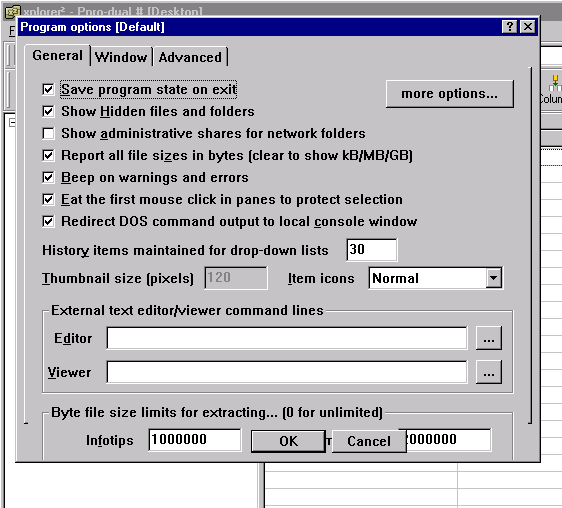
the others are at
http://abames.iwarp.com/photo.html
thx for any help
A.B.Ames
I found a wesite to post the pics too here is one:
the others are at
http://abames.iwarp.com/photo.html
thx for any help
A.B.Ames
-
nikos
- Site Admin
- Posts: 16402
- Joined: 2002 Feb 07, 15:57
- Location: UK
-
A.B.Ames
- Member
- Posts: 33
- Joined: 2004 Aug 07, 20:10