how to sort
Moderators: fgagnon, nikos, Site Mods
-
nikos

- Site Admin

- Posts: 16374
- Joined: 2002 Feb 07, 15:57
- Location: UK
Re: how to sort
this is a very smart trick but the files will be sorted with date ASCENDING (older files first) or the folders will be inversely alphabetical, as the programmable column is text. For more information see the documentation
-
otlaolap
- Silver Member

- Posts: 253
- Joined: 2007 Aug 11, 21:37
Re: how to sort
The programmable column string
along with the tool option to sort folders at the top of the pane gives me, when selected as the sort column, folders ascending by name followed by files descending by modified date. Note that the column must be sorted in ascending order as, for files, the programmable field is the number of days since modification. Unfortunately, the date arithmetic available to the programmable column rounds dates and times to dates only when doing arithmetic, so the files are sorted by modified days only and not by modified days-and-times.
The programmable column string
along with the tool option to sort folders at the top of the pane gives me, when selected as the sort column, folders ascending by name followed by files descending by modified date-and-time. This implements a (probably (possibly?)) correct date-and-time sorting of the files. (I know the repeated multiplications can be simplified but I do not see how to reduce the number of extractions of datetime and date using the one allowed line of code.) The two long computations, one for DATE("") (i.e. now) and one for the file modified time, are simply years in seconds plus months in seconds plus days in seconds plus hours in seconds plus minutes in seconds plus seconds in seconds. The result for files is the difference of these two accumulations of seconds. All years are treated as leap years and all months are treated as 31-day months for simplicity and since this simplification will not change the sort order.
Code: Select all
if(mid(${Attributes},5,1)="d",${Name},Date(date(""))-date(${Modified}))The programmable column string
Code: Select all
if(mid(${Attributes},5,1)="d",0,(int(mid(datetime((Date("")),"YYYYMMDD","HHMMSS"),01,04))*366*31*24*60*60+int(mid(datetime((Date("")),"YYYYMMDD","HHMMSS"),05,02))*31*24*60*60+int(mid(datetime((Date("")),"YYYYMMDD","HHMMSS"),07,02))*24*60*60+int(mid(datetime((Date("")),"YYYYMMDD","HHMMSS"),09,02))*60*60+int(mid(datetime((Date("")),"YYYYMMDD","HHMMSS"),11,02))*60+int(mid(datetime((Date("")),"YYYYMMDD","HHMMSS"),13,02)))-(int(mid(datetime((${Modified}),"YYYYMMDD","HHMMSS"),01,04))*366*31*24*60*60+int(mid(datetime((${Modified}),"YYYYMMDD","HHMMSS"),05,02))*31*24*60*60+int(mid(datetime((${Modified}),"YYYYMMDD","HHMMSS"),07,02))*24*60*60+int(mid(datetime((${Modified}),"YYYYMMDD","HHMMSS"),09,02))*60*60+int(mid(datetime((${Modified}),"YYYYMMDD","HHMMSS"),11,02))*60+int(mid(datetime((${Modified}),"YYYYMMDD","HHMMSS"),13,02))))-
nikos
- Site Admin
- Posts: 16374
- Joined: 2002 Feb 07, 15:57
- Location: UK
Re: how to sort
you are hereby awarded a PhD in programmable columns 
-
Kilmatead
- Platinum Member

- Posts: 4863
- Joined: 2008 Sep 30, 06:52
- Location: Baile Átha Cliath
Re: how to sort
Indeed, good job, and very clever - I had not thought of exploiting the inherent 0 sorting anomaly, though I have my doubts about the descending foldersort...
Since I can't abide by ridiculously long and painfully repetitive formulae, I made a little proof-of-concept plugin which provides two "helper properties" for programmable columns to make otlaolap's code more human-friendly.
These helpers are just in case anyone ever wants to use TimeNow and TimeFileModified (as dynamically-computed integers in seconds) without having to kill yourself (and your eyesight) using otlaolap's manual conversion to seconds. In other words, his crazy long formula above can be simplified down to:
...which is a lot easier to read and use should anyone ever care to edit/build-upon his idea! (We still have the queer sorting inversion, but this is at least my small contribution to stopping the unnecessary code-bloat.)
This is a WDX plugin so you already know how to use it: funC v0.0.0.2
Why is it called funC? I'm feeling punny today.
Anyway, just to show that my functions (really columns) amount to the same thing, here's a breakdown of the values using two programmable columns, the first is otlaolap's unwieldy (but great!) contraption, and the second uses the simplified code with the plugin helpers:
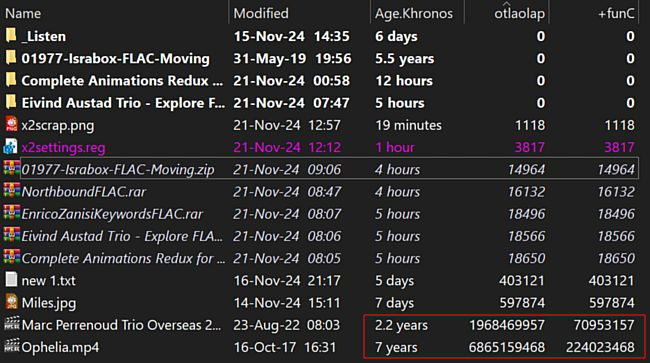
 Note the curious discrepancy in the bottom two values - it's a constant offset of 1897516800 seconds, which is around 21962 days, or roughly 60 years worth of seconds. Determining what this represents kind of bumfuzzled my poor noggin, so I don't have a definitive answer, but I think it has to do with how otlaolap decided to treat all years as leap years, and just let the dust settle elsewhere, whereas I'm seeding the times from Windows API and not from nikos's date variants. For example, the epoch for windows timestamps is calculated from the year 1601, and the epoch is effectively defined to January 1st, 1970 (134774 days or 369 years). During that time there were 89 leap years, plus another 14 leap years until 2024, and 54 years since 1970. Now 54 years isn't 60 years (as the delta provides), but it's the only distinction I can arrive at. If anyone else knows the deal, please speak up.
Re-reading otlaolap's description, he does mention some oddities with the conversion-to-seconds that might account for it - I know that the 70955568 seconds delta is accurate for the "2.2 years old" file... but a rounding-up "error" of 60 years is a little hard to see from his string-dissection. I hope poor Kermit doesn't look like that when he's 60 and gets to the great biology-student-worktable in the sky.
As mentioned above, this idea of (mis)using WDX plugins for providing user-based helper functions is presented here as a proof of concept - what I'm actually doing is just defining two new columns: fSecNow.funC and fFileSecs.funC, which are what they say they are. (Ok, yes, I admit I toyed with the idea of calling it fFileSex.funC but in these days of woke nonsense I didn't want to get involved in determining the anatomical birth genders of filesystem objects and their relative values... like how in French depending on what you mean by "folder" / "classeur" / "dossier" are nominally feminine, but something vague like "chemise" is itself nominally masculine. So what's a PDF? PNG? TXT? My brain is messed up enough as it is, so all files and folders are hereby declared celibate in my universe.)
The nice part about this kind of setup is that you don't need to "activate" the plugin columns in order to use them, the programmable column will derive their values all by itself, so you only have to "see" the programmable column, not my "helper" columns - which means I could write/add as many as I wanted to, depending on the common needs of what users may use in their formulae. Obviously, I'm limited to providing/interpreting static information about the file itself (whatever nikos doesn't already include), but hey, that's why this is "proof of concept".
Anyway, enjoy!
(Anyone still paying attention will note that I could have actually accomplished this result in a plugin all by itself without using a programmable column at all, had I only thought of, as mentioned originally, exploiting the internal sort mechanics of x2. This is my failure of imagination.)
Since I can't abide by ridiculously long and painfully repetitive formulae, I made a little proof-of-concept plugin which provides two "helper properties" for programmable columns to make otlaolap's code more human-friendly.
These helpers are just in case anyone ever wants to use TimeNow and TimeFileModified (as dynamically-computed integers in seconds) without having to kill yourself (and your eyesight) using otlaolap's manual conversion to seconds. In other words, his crazy long formula above can be simplified down to:
Code: Select all
if(mid(${Attributes},5,1)="d",0,int(${fSecNow.funC} - ${fFileSecs.funC}))This is a WDX plugin so you already know how to use it: funC v0.0.0.2
Why is it called funC? I'm feeling punny today.
Anyway, just to show that my functions (really columns) amount to the same thing, here's a breakdown of the values using two programmable columns, the first is otlaolap's unwieldy (but great!) contraption, and the second uses the simplified code with the plugin helpers:
Note the curious discrepancy in the bottom two values - it's a constant offset of 1897516800 seconds, which is around 21962 days, or roughly 60 years worth of seconds. Determining what this represents kind of bumfuzzled my poor noggin, so I don't have a definitive answer, but I think it has to do with how otlaolap decided to treat all years as leap years, and just let the dust settle elsewhere, whereas I'm seeding the times from Windows API and not from nikos's date variants. For example, the epoch for windows timestamps is calculated from the year 1601, and the epoch is effectively defined to January 1st, 1970 (134774 days or 369 years). During that time there were 89 leap years, plus another 14 leap years until 2024, and 54 years since 1970. Now 54 years isn't 60 years (as the delta provides), but it's the only distinction I can arrive at. If anyone else knows the deal, please speak up. Re-reading otlaolap's description, he does mention some oddities with the conversion-to-seconds that might account for it - I know that the 70955568 seconds delta is accurate for the "2.2 years old" file... but a rounding-up "error" of 60 years is a little hard to see from his string-dissection. I hope poor Kermit doesn't look like that when he's 60 and gets to the great biology-student-worktable in the sky.
As mentioned above, this idea of (mis)using WDX plugins for providing user-based helper functions is presented here as a proof of concept - what I'm actually doing is just defining two new columns: fSecNow.funC and fFileSecs.funC, which are what they say they are. (Ok, yes, I admit I toyed with the idea of calling it fFileSex.funC but in these days of woke nonsense I didn't want to get involved in determining the anatomical birth genders of filesystem objects and their relative values... like how in French depending on what you mean by "folder" / "classeur" / "dossier" are nominally feminine, but something vague like "chemise" is itself nominally masculine. So what's a PDF? PNG? TXT? My brain is messed up enough as it is, so all files and folders are hereby declared celibate in my universe.)
The nice part about this kind of setup is that you don't need to "activate" the plugin columns in order to use them, the programmable column will derive their values all by itself, so you only have to "see" the programmable column, not my "helper" columns - which means I could write/add as many as I wanted to, depending on the common needs of what users may use in their formulae. Obviously, I'm limited to providing/interpreting static information about the file itself (whatever nikos doesn't already include), but hey, that's why this is "proof of concept".
Anyway, enjoy!
(Anyone still paying attention will note that I could have actually accomplished this result in a plugin all by itself without using a programmable column at all, had I only thought of, as mentioned originally, exploiting the internal sort mechanics of x2. This is my failure of imagination.)
-
johngalt

- Gold Member

- Posts: 653
- Joined: 2008 Feb 10, 19:41
- Location: 3rd Rock
