I'm having trouble finding duplicates.
I was travelling and had my camera set on the wrong time zone. So I used an EXIF tool to correct the time zone. However unfortunately the system kept both files - you could indeed ask how I didn't notice that. However, then I manipulated the filenames to be different without noticing this duplicate files error. This and ?whatever has lead to a ton of duplicated image files with slightly different file sizes as well as different dates and names.
So I cannot compare on file name, file date, EXIF date, file size. I figure the only way is to compare on file contents.
When I put in "photos" as the file type then automatically some file properties are added: so I figure the best way is to search for all file types, compare file content, say 99% similarity, and no additional file properties.... But this doesn't work: I get no 'hits'.
I go back to adjust comparison rules, check the rules, change to 90% similarity, and click start: however the 'new project summary" show 'Compare these properties: Item NameDisplay, Size,Datemodified, check file content:False." That's no good - why is it those properties are there?
I cannot seem to get rid of those 'additional file properties'.
Can I actually perform a scan solely based on the file contents?
Thanks Richard
i-DeClone not finding duplicates - ? search parameters
Moderator: nikos
-
rnmerchant
- Member

- Posts: 49
- Joined: 2020 Nov 23, 01:20
-
nikos

- Site Admin

- Posts: 16430
- Joined: 2002 Feb 07, 15:57
- Location: UK
Re: i-DeClone not finding duplicates - ? search parameters
this is a difficult task as declone doesn't have any ground to stand on so to speak
but you can try this:
in scan options page pick similarity 99% as you have it, then in ADVANCED property page make sure CONTENT is ticked
Untick the AUTOMATIC property checkbox, remove the Date taken from the box, and add AVERAGE BRIGHTNESS property (in LEGACY category)
that should find quite a few of them
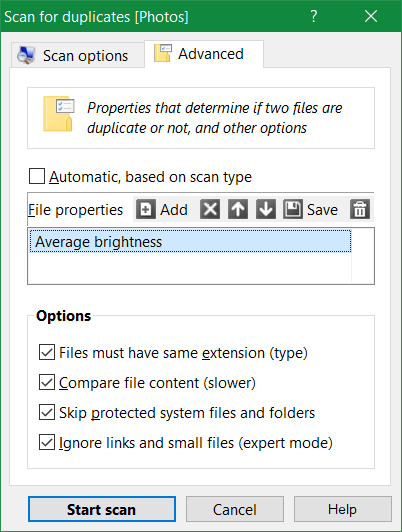
but you can try this:
in scan options page pick similarity 99% as you have it, then in ADVANCED property page make sure CONTENT is ticked
Untick the AUTOMATIC property checkbox, remove the Date taken from the box, and add AVERAGE BRIGHTNESS property (in LEGACY category)
that should find quite a few of them
-
rnmerchant
- Member
- Posts: 49
- Joined: 2020 Nov 23, 01:20
Re: i-DeClone not finding duplicates - ? search parameters
I have just got back to this project.
I did a test file of 40 images which I copied, changed the picture date by an hour, combined the directories (so every picture had a duplicate) and ran the comparison.
I had cheated a bit because when I was out walking and taking the photos, I bracked the photos ±1 stop so I had really 3 identical photos for each image with different exposures/'brightness' (thus not identical) - but then a few times I had taken two sets of images of a particular scene separated by a few seconds. Strictly speaking those sets should have been slightly different as I likely moved the camera a bit, or something else - but admittedly likely very slightly different..
Using the paramaters Nikos suggested - 99% similarity and "Average Brightness" property (not "Brightness" - that didn't work) the program correctly identified the majority of duplicate photos. However those 'ringer' photos I described above were identified as "duplicate" - perhaps not incorrectly as they were likely at least 99% the same... But if one wanted to keep even those one would have to correct the result rather than accept the utility as absolutely correct.
This has inadvertently answered another part of my question: it seems that putting in the additional parameter before removing the default parameters offered successfully removes them - recall I had noted that if I simply removed them only then when running the comparison they had magically reappeared.
Thanks Nikos!
Richard
I did a test file of 40 images which I copied, changed the picture date by an hour, combined the directories (so every picture had a duplicate) and ran the comparison.
I had cheated a bit because when I was out walking and taking the photos, I bracked the photos ±1 stop so I had really 3 identical photos for each image with different exposures/'brightness' (thus not identical) - but then a few times I had taken two sets of images of a particular scene separated by a few seconds. Strictly speaking those sets should have been slightly different as I likely moved the camera a bit, or something else - but admittedly likely very slightly different..
Using the paramaters Nikos suggested - 99% similarity and "Average Brightness" property (not "Brightness" - that didn't work) the program correctly identified the majority of duplicate photos. However those 'ringer' photos I described above were identified as "duplicate" - perhaps not incorrectly as they were likely at least 99% the same... But if one wanted to keep even those one would have to correct the result rather than accept the utility as absolutely correct.
This has inadvertently answered another part of my question: it seems that putting in the additional parameter before removing the default parameters offered successfully removes them - recall I had noted that if I simply removed them only then when running the comparison they had magically reappeared.
Thanks Nikos!
Richard
-
nikos
- Site Admin
- Posts: 16430
- Joined: 2002 Feb 07, 15:57
- Location: UK
Re: i-DeClone not finding duplicates - ? search parameters
if the target photos are 100% identical, including exif tags, then you don't need the similarity 99%
just search for exact photos by content and brightness
just search for exact photos by content and brightness