How do I create a symbolic link or a junction link
Moderators: fgagnon, nikos, Site Mods
-
otlaolap
- Silver Member

- Posts: 253
- Joined: 2007 Aug 11, 21:37
How do I create a symbolic link or a junction link
I'd like to try out symbolic and junction links to see if they will help me in a particular use case. The quick guide, in the NTFS Links section, instructs me to use copy and then use paste special (both while running in administrator mode) to do these. When after copy I select paste and then paste special I get the options "Hard link", "Folder structure", and "Structured scrap clips". There is also a "Paste link" menu item in the the paste menu. None of these suggest to me how I paste specifically a junction or symbolic link. What should I be doing?
-
nikos

- Site Admin

- Posts: 16401
- Joined: 2002 Feb 07, 15:57
- Location: UK
Re: How do I create a symbolic link or a junction link
you must use the MAIN menu to see these special paste commands (EDIT > PASTE SPECIAL...)
btw you don't need to run as administrator, xplorer2 will do it if necessary behind the scenes
btw you don't need to run as administrator, xplorer2 will do it if necessary behind the scenes
-
otlaolap
- Silver Member
- Posts: 253
- Joined: 2007 Aug 11, 21:37
Re: How do I create a symbolic link or a junction link
There they are. Thank you.
-
FrizzleFry

- Platinum Member

- Posts: 1258
- Joined: 2005 Oct 16, 19:09
Re: How do I create a symbolic link or a junction link
Another good program to use with hard or symbolic links and junctions is Link Shell Extension.
-
Kilmatead
- Platinum Member
- Posts: 4879
- Joined: 2008 Sep 30, 06:52
- Location: Baile Átha Cliath
Re: How do I create a symbolic link or a junction link
A few random thoughts if you're new to these paradigms (which is suspicious with a name like yours?otlaolap wrote: 2025 Mar 12, 14:44 I'd like to try out symbolic and junction links to see if they will help me in a particular use case.
 )
)I'd recommend creating a colour-coding rule or two (one for files, one for folders) which check for Attribute 'J', simply to make them stand out when you've moved beyond the apéritif stage of foreplay and have even just one or two lying around the place - it's easy to forget what/where they are. And always remember that highlighting one will show its destination in the <Ctrl+Z> details-pane, which is handy, as when you create one x2 automatically gives the link the same name as the folder it points to, but you are allowed to rename it to whatever you prefer, which can help confuse the hapless adventurer.
And Frizzle beat me to it: If you do eventually drink the Reparse Kool-Aid, you can really get your freak on and play with the superlative LinkShellExtension which can do pretty much everything possible with our little quantum-mechanic defying friends. But keep in mind that that extension can be a little overwhelming for beginners. The website, however is an excellent trove of reparse-related information. Links aren't just neat tools, they're a lifestyle.
But really, colour-coding. Makes everything better.
-
otlaolap
- Silver Member
- Posts: 253
- Joined: 2007 Aug 11, 21:37
Re: How do I create a symbolic link or a junction link
Long ago I added some immediate hotkey menus for color-coding a selected item (e.g. Alt+mmr (i.e Alt+m followed by m followed by r) meaning mentally "make mark red" and of course Alt+mmg and Alt+mmy and so on) using the mechanism that puts a rectangle around the file name. And color-coding rules for certain classes of file using the mechanism that changes the color of text for the file name. And, especially useful, color-coding rules to make the background bright yellow for files that were modified today and then diminishing the intensity of the highlight linearly over seven days. Nikos gives us things to play with and so we play. And, Kilmataed, I still customize the resource file on every release using a Resource Hacker script in the way you taught many years ago simply because I detest a couple of things like "items exist; clear filters to show them" (from memory as I'm on a trip without access to my computer) and "draft" versus "native" as antonym choices and a few other trivialities.
-
Kilmatead
- Platinum Member
- Posts: 4879
- Joined: 2008 Sep 30, 06:52
- Location: Baile Átha Cliath
Re: How do I create a symbolic link or a junction link
Why stick with trivialities when you can lay reckless waste to Nikos' tyrannical lack of understanding about left and right?otlaolap wrote: 2025 Mar 15, 22:52 I still customize the resource file on every release using a Resource Hacker script in the way you taught many years ago ... antonym choices and a few other trivialities.
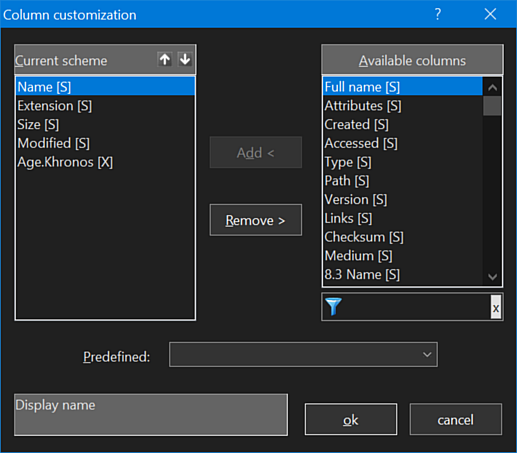
<Left becomes Right, and more room to stretch one's toes...>
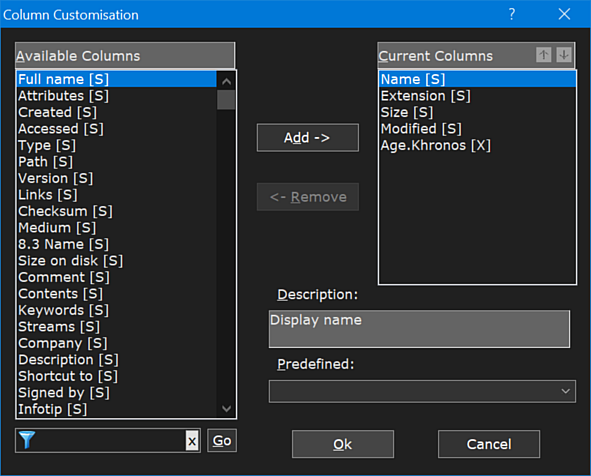
But hey, maybe it's just me who thinks if someone has a superficial misunderstanding of Capitalising Words (like 'Ok' and 'Cancel'?), they might, just might, have fundamentally deeper problems?

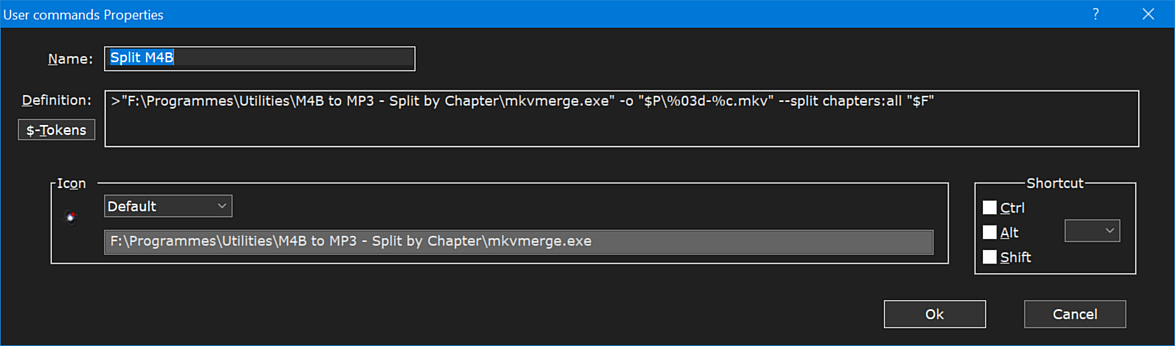
And have you ever tried to take over a small European country with a cramped & impossible-to-read user-command?
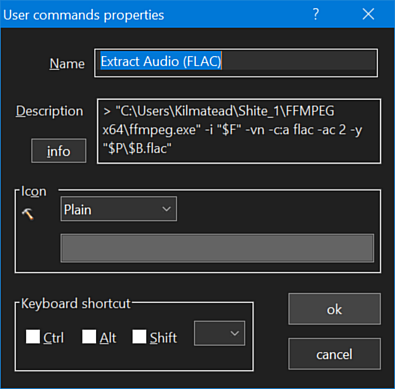
Just relax and smite your colonial-oppressors from the comfort of your own home like Bugs Bunny smokin' a carrot cigar.
-
nikos
- Site Admin
- Posts: 16401
- Joined: 2002 Feb 07, 15:57
- Location: UK
Re: How do I create a symbolic link or a junction link
funny I was just yesterday thinking that "available columns" listbox needs to get wider or use tooltips to show cropped property names. Spooky!
-
Kilmatead
- Platinum Member
- Posts: 4879
- Joined: 2008 Sep 30, 06:52
- Location: Baile Átha Cliath
Re: How do I create a symbolic link or a junction link
There's really just two that are cut.. Optional Attendee Addresses and Required Attendee Addresses... though I doubt 1 in 10,000 people actually use those.
The [X] columns often have their name-suffixes attached too, pushing the limit, so I just did it for readability and (of course) my general attitude towards thumbing my nose at your horribly claustrophobic design ethos.
The [X] columns often have their name-suffixes attached too, pushing the limit, so I just did it for readability and (of course) my general attitude towards thumbing my nose at your horribly claustrophobic design ethos.
-
pj
- Gold Member

- Posts: 518
- Joined: 2006 Jan 26, 14:01
- Location: Florida
Re: How do I create a symbolic link or a junction link
Care to enlighten us poor innocents just what incantations are needed to produce these changes, other than point to a piece of software that is needed?Kilmatead wrote: 2025 Mar 16, 08:40 ...
The [X] columns often have their name-suffixes attached too, pushing the limit, so I just did it for readability and (of course) my general attitude towards thumbing my nose at your horribly claustrophobic design ethos.
I mean, if I need instructions to build something, perhaps something more substantial than a link to a hammer might be appreciated.

--------------
PJ in (rapidly cooling) FL