future: custom line spacing

Discussion & Support for xplorer² professional

Moderators: fgagnon, nikos, Site Mods

User avatar
nikos
Site Admin
Site Admin
Posts: 16344
Joined: 2002 Feb 07, 15:57
Location: UK

future: custom line spacing

Post by nikos »

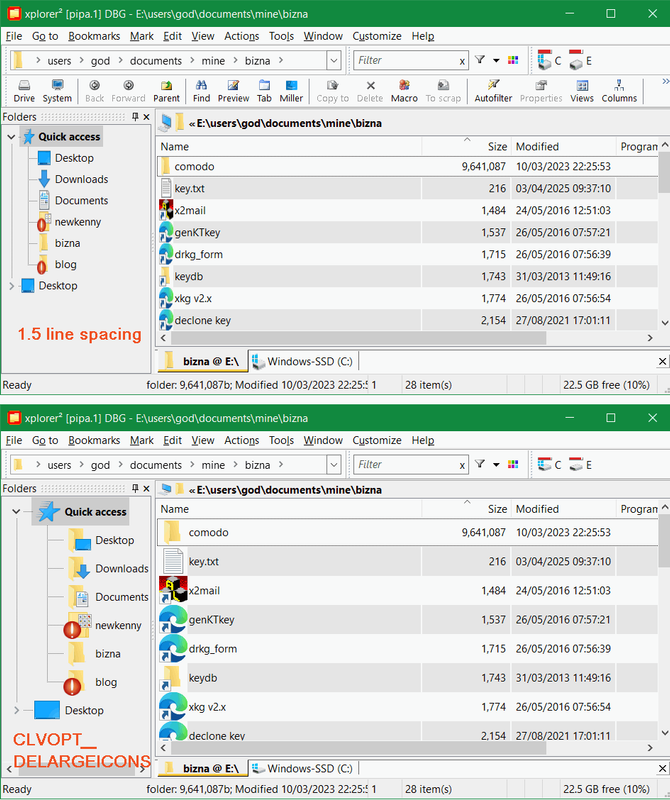
I have started work on v6.2, and am playing with a custom line spacing. There is no clean way to do this other than resizing the imagelist (vertical stretch). As a result the icons look a bit funny. Compare 1.5 stretched line spacing with the old CLVOPT_DELARGEICONS setting that uses large icons to increase the spacing. The latter is better looking but cannot be adjusted

what do you think?
Image
User avatar
nikos
Site Admin
Site Admin
Posts: 16344
Joined: 2002 Feb 07, 15:57
Location: UK

Re: future: custom line spacing

Post by nikos »

ps. I am a bit short on "headline" features to add, so please be free to recommend something "big"
Tuxman
Platinum Member
Platinum Member
Posts: 1708
Joined: 2009 Aug 19, 07:49

Re: future: custom line spacing

Post by Tuxman »

nikos wrote: 2025 Jun 02, 10:05 what do you think?
Icons with an uneven aspect ratio look like poo.
nikos wrote: 2025 Jun 02, 10:06 please be free to recommend something "big"
Port it to macOS! :D
... Too big?
pj
Gold Member
Gold Member
Posts: 516
Joined: 2006 Jan 26, 14:01
Location: Florida

Re: future: custom line spacing

Post by pj »

Something big: undo
User avatar
nikos
Site Admin
Site Admin
Posts: 16344
Joined: 2002 Feb 07, 15:57
Location: UK

Re: future: custom line spacing

Post by nikos »

actually I am trying a little something for undo, but not as big as you'd like...
dunno
Gold Member
Gold Member
Posts: 529
Joined: 2007 Nov 18, 03:00
Location: Tropical Hammock

Re: future: custom line spacing

Post by dunno »

Port it to Linux.
User avatar
nikos
Site Admin
Site Admin
Posts: 16344
Joined: 2002 Feb 07, 15:57
Location: UK

Re: future: custom line spacing

Post by nikos »

some of you use other file managers to the side (ahem), are there any killer features that xplorer2 doesn't have?
Gandolf
Gold Member
Gold Member
Posts: 575
Joined: 2004 Jun 12, 10:47

Re: future: custom line spacing

Post by Gandolf »

Middle (vertical) tool-bar.

Make the dialogue boxes as they were, they worked! The "stupid" blue, hardly visible, options make them unusable. Why have a "Tools | Options" section if you put options elsewhere?

But you've already made it clear neither of theses are possible.

If you want the options in the dialogue, do as some text editors do, always open with a simple dialogue, have an "advanced" or "additional" button which opens the additional options for that one instance. I cannot see the point of the way you are doing it.

Disc "Percentage full" in a graphical form (as Tablacus Explorer and several other file managers).

As you know, I don't use V6 and only use 5.5.0.1 for one specific purpose.
User avatar
nikos
Site Admin
Site Admin
Posts: 16344
Joined: 2002 Feb 07, 15:57
Location: UK

Re: future: custom line spacing

Post by nikos »

if it bothers you that much, use kilmatead's resource editing hack and remove the offensive link control from find files (filter) dialog

since v6 xplorer2 shows graphical free space on drivebar buttons
any great features in the "other" file manager you are using since you ditched xplorer2? ;)
pj
Gold Member
Gold Member
Posts: 516
Joined: 2006 Jan 26, 14:01
Location: Florida

Re: future: custom line spacing

Post by pj »

nikos wrote: 2025 Jun 02, 14:49 actually I am trying a little something for undo, but not as big as you'd like...
I understand the difficulties of "undo-ing" everything that might be done.

What things do you think you might be able to handle with UNDO?

Personally, I'd like to see the following being handled:
  • moves - when I accidentally drag a file or folder and drop it somewhere else, especially when half asleep, and I have no clue what I've just done.
  • delete (see above)
  • rename
  • attributes (maybe)
See, I'm not as unreasonable as you might think, despite my past history of rants, etc.
--------------------
PJ in (raining!) FL
Kilmatead
Platinum Member
Platinum Member
Posts: 4842
Joined: 2008 Sep 30, 06:52
Location: Baile Átha Cliath

Re: future: custom line spacing

Post by Kilmatead »

nikos wrote: 2025 Jun 03, 16:47 since v6 xplorer2 shows graphical free space on drivebar buttons
Slightly tangential to this thread, but how often does x2 actually poll the free-space to update the graphical icon?

I've noticed that when drives fill up the icon helpfully turns red, but (since the drive is full) I actively go out of my way to transfer as much nonsense off the drive as possible, yet no matter how much I get rid of (sometimes half the drive!) the icon stubbornly remains red, and even refreshing doesn't seem to do anything.

Restarting x2 does force the icon to change back to normal (blue), but it seems to me this should happen automatically, no? (Or, if it is automatic, it certainly doesn't sense the increase in free-space at the same polling rate that it senses the reduction.)
pj wrote: 2025 Jun 03, 17:00 moves - when I accidentally drag a file or folder and drop it somewhere else, especially when half asleep, and I have no clue what I've just done.
One word for you (in case Nikos doesn't bend to your iron will), TeraCopy. It keeps a log of all transfers (conveniently in the main interface), including drag-&-drop (if registered as the handler). It has saved my bacon, eggs, Florida Orange Juice, and my arse many times over from exactly this dilemma, as I too have "less-than-reliable" mouse-drag-aim. :wink:

To be fair, there does exist in x2 the Go to -> Drop Target command, but that only tracks the last target, not all the other mistakes from the last few weeks (like the inappropriate drunken flirting with that chick from Idaho at that last symposium you attended - TeraCopy sees all).
Tuxman
Platinum Member
Platinum Member
Posts: 1708
Joined: 2009 Aug 19, 07:49

Re: future: custom line spacing

Post by Tuxman »

I second TeraCopy. I accidentally got a pro version as a prize many years ago, for a reason I can't remember, and it still works just well. :D
Kilmatead
Platinum Member
Platinum Member
Posts: 4842
Joined: 2008 Sep 30, 06:52
Location: Baile Átha Cliath

Re: future: custom line spacing

Post by Kilmatead »

Tuxman wrote: 2025 Jun 03, 20:07 ...and it still works just well.
Not using Windows 11 myself I cannot test it, but it might also be a solution to the progress-window-focus problems (apparently) plaguing drag-&-drop users of late. :shrug:
Tuxman
Platinum Member
Platinum Member
Posts: 1708
Joined: 2009 Aug 19, 07:49

Re: future: custom line spacing

Post by Tuxman »

Windows 11 comes with its very own set of surprising changes, almost none of them being a good thing.
User avatar
IneedHelp
Gold Member
Gold Member
Posts: 620
Joined: 2010 Feb 04, 02:15
Location: MeanWhile City

Re: future: custom line spacing

Post by IneedHelp »

For the drag-and-drop agnostics among the dual-pane congregation, you can add these user commands:

Code: Select all

>"C:\Program Files\TeraCopy\TeraCopy.exe" Copy *"$>" "$I"

Code: Select all

>"C:\Program Files\TeraCopy\TeraCopy.exe" Move *"$>" "$I"
Image