Or, for those old-timer's who still use Menuhack (
future: custom line spacing
Moderators: fgagnon, nikos, Site Mods
-
Kilmatead
- Platinum Member

- Posts: 4842
- Joined: 2008 Sep 30, 06:52
- Location: Baile Átha Cliath
Re: future: custom line spacing
Or, for those who are so used to x2's <Ctrl+F5/F6> shortcuts and have come to think that user-commands are evidence of the Devil meddling with human free-will (or who simply wish to temporarily try TeraCapy), you can just disable x2's Robust Copy in the advanced options and it will pick it up automatically.
Or, for those old-timer's who still use Menuhack (
), and don't mind the Devil's meddling, the user commands would be 32793 CTRL and 32794 CTRL respectively - allowing the use of the same buttons for any other transfer-replacement utility as well.
Or, for those old-timer's who still use Menuhack (
-
nikos
- Site Admin

- Posts: 16344
- Joined: 2002 Feb 07, 15:57
- Location: UK
Re: future: custom line spacing
so what does this teracopy have that xplorer2 doesn't (other than undo)?
-
IneedHelp
- Gold Member

- Posts: 620
- Joined: 2010 Feb 04, 02:15
- Location: MeanWhile City
Re: future: custom line spacing
To name a few things, it's a separate process, so if something were to happen to x2 during lengthy transfers, the operation would not be interrupted, it keeps all the timestamps and attributes of the moved/copied files/folders intact, it's a dedicated application for file transfer that is independent of used file managers.
-
nikos
- Site Admin

- Posts: 16344
- Joined: 2002 Feb 07, 15:57
- Location: UK
Re: future: custom line spacing
xplorer2 has an option to keep file dates intact too (only needed for folders and creation dates)
-
Kilmatead
- Platinum Member

- Posts: 4842
- Joined: 2008 Sep 30, 06:52
- Location: Baile Átha Cliath
Re: future: custom line spacing
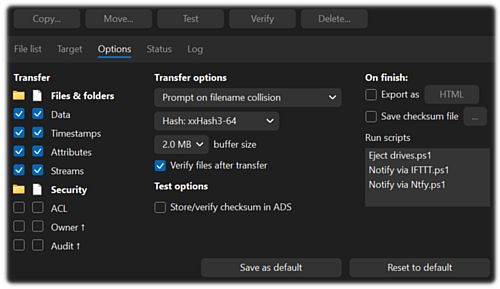
And it has 52 different hashing algorithms built-in, which makes me giddy like a schoolgirl drunk at the prom of absurdity. 
Basically, it just has options up the wazoo, which makes everything taste better:

Basically, it just has options up the wazoo, which makes everything taste better:

-
nikos
- Site Admin

- Posts: 16344
- Joined: 2002 Feb 07, 15:57
- Location: UK
Re: future: custom line spacing
aristotle said Πάν μέτρον άριστον obviously you missed the point 
it means avoid all extremes
-
Kilmatead
- Platinum Member

- Posts: 4842
- Joined: 2008 Sep 30, 06:52
- Location: Baile Átha Cliath
Re: future: custom line spacing
Ah, the middle-classes... so reliable, dependable, so sure of their delusion that limits must be imposed from others above them for their own good.
Attempting to touch both extremes at the same time is the true test of a man's perception of his own limits. And he can't know it until he does it; setting his failures to the wind.
Where Socrates' death and Aristotle's birth are separated by less than twenty years, even the latter had to chuckle sometimes at the progressive follies of the former, but secretly embrace them nonetheless.
Any thoughts on my previous query above: "...how often does x2 actually poll the free-space to update the graphical icon?" You're so used to not reading my posts that you miss the serious bits: embrace the whole.
Attempting to touch both extremes at the same time is the true test of a man's perception of his own limits. And he can't know it until he does it; setting his failures to the wind.
Where Socrates' death and Aristotle's birth are separated by less than twenty years, even the latter had to chuckle sometimes at the progressive follies of the former, but secretly embrace them nonetheless.
Any thoughts on my previous query above: "...how often does x2 actually poll the free-space to update the graphical icon?" You're so used to not reading my posts that you miss the serious bits: embrace the whole.
-
Gandolf
- Gold Member

- Posts: 575
- Joined: 2004 Jun 12, 10:47
Re: future: custom line spacing
I've already used Resource Hacker and removed the "simple version" / "more properties" from the dialogues. But it didn't work - it destroyed the address (crumb) bar. I couldn't be bothered to investigate why.nikos wrote: 2025 Jun 03, 16:47 if it bothers you that much, use kilmatead's resource editing hack and remove the offensive link control from find files (filter) dialog
Drivebar graphical display is a joke, it's microscopic. I can have 14+ external removable drives, sometimes I need them listed by available space. You try and see which of the drives has the most space on it in a Drivebar of 14 drives!!
The main reason, as you know, that I've been forced to stop using x² at v5 is that my scripts, many of which automate dialogues, don't work in v6. They work in the other file managers. [The scripts detect the file manager running, and send the appropriate commands. Trying to get them to work in x² v6 became a PITA, so I did the obvious, and abandoned x²].
It's "horses for courses" - x² is now the wrong horse.
Using other file managers that work the way I want is the most practical solution (and less stressing, than "hacking" x²).
Remember Nikos, #1 rule of business: "The customer is always right...".
-
IneedHelp
- Gold Member

- Posts: 620
- Joined: 2010 Feb 04, 02:15
- Location: MeanWhile City
Re: future: custom line spacing
Many years ago I found that even something as simple as changing the x2 icon kept triggering zabkat’s piracy detection. Can't really blame it though - tampering with executables is exactly what such protections are meant to catch. If anything, it’s only made me more determined to build my own file manager.(and less stressing, than "hacking" x²)
-
Tuxman
- Platinum Member

- Posts: 1708
- Joined: 2009 Aug 19, 07:49
Re: future: custom line spacing
So, how is it going?IneedHelp wrote: 2025 Jun 04, 20:53 If anything, it’s only made me more determined to build my own file manager.![]()
-
nikos
- Site Admin

- Posts: 16344
- Joined: 2002 Feb 07, 15:57
- Location: UK
Re: future: custom line spacing
it never changes the icon; but you can hide/show the drivebar and it should recreate itself with the latest statsKilmatead wrote: 2025 Jun 04, 16:01how often does x2 actually poll the free-space to update the graphical icon?"
nowadays you can just drop a custom icon in the xplorer2 installation folder for this (X2ICON.ICO)IneedHelp wrote: 2025 Jun 04, 20:53 Many years ago I found that even something as simple as changing the x2 icon kept triggering zabkat’s piracy detection.
-
IneedHelp
- Gold Member

- Posts: 620
- Joined: 2010 Feb 04, 02:15
- Location: MeanWhile City
Re: future: custom line spacing
It combines all the features I appreciate from x2 and other file managers (both well-known and obscure). Currently, I'm migrating it from .NET Framework 4.8 to .NET 9.0. The only thing it can't replicate is the nostalgia factor, which is why x2 still remains installed on my systems.
That functionality was likely added within the last two years. However, based on my experience, while you can customize the window icon this way, it doesn't affect the taskbar or system tray icons, those still use the executable's embedded icon.nikos wrote: 2025 Jun 05, 04:31 nowadays you can just drop a custom icon in the xplorer2 installation folder for this (X2ICON.ICO)
-
nikos
- Site Admin

- Posts: 16344
- Joined: 2002 Feb 07, 15:57
- Location: UK
Re: future: custom line spacing
I just checked and for w10 at least the taskbar button does change as well as the program window icon
-
IneedHelp
- Gold Member

- Posts: 620
- Joined: 2010 Feb 04, 02:15
- Location: MeanWhile City
Re: future: custom line spacing
The behavior seems to depend on the OS's whims. I've observed cases where the displayed icon could be the executable's embedded icon, a custom icon, or even the shortcut-assigned icon. This inconsistency likely stems from race conditions in the icon loading process, caching artifacts, window chrome management or some other obscure subsystem interaction.
-
victor50
- Member

- Posts: 50
- Joined: 2007 Mar 19, 20:36
Re: future: custom line spacing
One of the worst things is the taskbar it is completely unusable. I could upgrade to W11 when I found out that you can restore the W10 taskbar:Tuxman wrote: 2025 Jun 03, 21:38 Windows 11 comes with its very own set of surprising changes, almost none of them being a good thing.
https://github.com/valinet/ExplorerPatc ... .2_14807a5