updated the documentation, some bugfixes and some of your observations implemented (eg up/down preview comparison, ESC to quit fullscreen)
https://www.zabkat.com/test/xplorer2_se ... t_beta.exe
xplorer2 v6.107 beta
Moderators: fgagnon, nikos, Site Mods
-
Kilmatead
- Platinum Member

- Posts: 4879
- Joined: 2008 Sep 30, 06:52
- Location: Baile Átha Cliath
Re: xplorer2 v6.107 beta
Why does everything about these betas remind me of film quotes? If Blue Horseshoe loves Anacott Steel, and they're trying to take over Bluestar Airlines, what does that have to do with the line spacing thing?
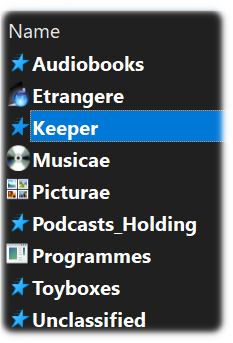
I understand the side-effect of icon distortion, but why do the default folder icons (Win10) turn into Charlie Sheen's comeuppance with anything over 100? Pic is 110. Curiously, any custom-assigned folder icons work fine (if a little goofy).
Switch back to 100 they return to yellow folders again.
200 does have a nice acid-flashback aesthetic about it, though. Way groovy, Scooby-Doo.
I understand the side-effect of icon distortion, but why do the default folder icons (Win10) turn into Charlie Sheen's comeuppance with anything over 100? Pic is 110. Curiously, any custom-assigned folder icons work fine (if a little goofy).
Switch back to 100 they return to yellow folders again.
200 does have a nice acid-flashback aesthetic about it, though. Way groovy, Scooby-Doo.
-
nikos

- Site Admin

- Posts: 16401
- Joined: 2002 Feb 07, 15:57
- Location: UK
Re: xplorer2 v6.107 beta
what windows version are you running?
i take it folder icons get screwed in all places not just the QAL?
i take it folder icons get screwed in all places not just the QAL?
-
Kilmatead
- Platinum Member
- Posts: 4879
- Joined: 2008 Sep 30, 06:52
- Location: Baile Átha Cliath
Re: xplorer2 v6.107 beta
Win10.
Did you know that QAL stands for Queensland Alumina Ltd? I didn't. 'Cause I also didn't know what you thought it stood for.
If you mean that the tabs and pane-headers get f'd up, yeah, the Alumina is strong in your droids.
Hey, I just noticed that on 200 the tiny blue "space filled" icons on the drive-bar get nice and big and chunky! Can we keep that but get rid of the other stuff? Pleeeeeeeze?
Me no likey
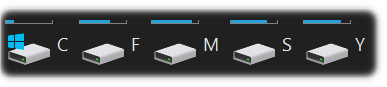
Me likey!!
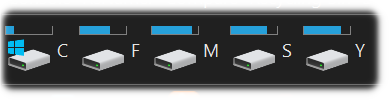
And, since I don't usually mess with these things, I see there's already an "Increase Line Spacing in Details View" setting (which works perfectly well, unless you hold <Ctrl> when scrolling), what's the benefit to this new system? That it works in list-view as well as details? At least, I guess, it doesn't have the <Ctrl+Scroll> reset bug.
Do people actually use these settings? Most people seem to want more real estate to view things (I'm growing more partial to this full-screen thingy), not waste it on whitespace.
Did you know that QAL stands for Queensland Alumina Ltd? I didn't. 'Cause I also didn't know what you thought it stood for.
If you mean that the tabs and pane-headers get f'd up, yeah, the Alumina is strong in your droids.
Hey, I just noticed that on 200 the tiny blue "space filled" icons on the drive-bar get nice and big and chunky! Can we keep that but get rid of the other stuff? Pleeeeeeeze?
Me no likey
Me likey!!
And, since I don't usually mess with these things, I see there's already an "Increase Line Spacing in Details View" setting (which works perfectly well, unless you hold <Ctrl> when scrolling), what's the benefit to this new system? That it works in list-view as well as details? At least, I guess, it doesn't have the <Ctrl+Scroll> reset bug.
Do people actually use these settings? Most people seem to want more real estate to view things (I'm growing more partial to this full-screen thingy), not waste it on whitespace.
-
nikos
- Site Admin
- Posts: 16401
- Joined: 2002 Feb 07, 15:57
- Location: UK
Re: xplorer2 v6.107 beta
i'll send you a debug version to solve this mystery... is it only folder icons that kak?
-
Kilmatead
- Platinum Member
- Posts: 4879
- Joined: 2008 Sep 30, 06:52
- Location: Baile Átha Cliath
Re: xplorer2 v6.107 beta
Yeah, just the stock system-folders. Any custom ones I set are fine, as are all (as far as I can see) icons for programmes, files, etc set by associations.
-
nikos
- Site Admin
- Posts: 16401
- Joined: 2002 Feb 07, 15:57
- Location: UK
Re: xplorer2 v6.107 beta
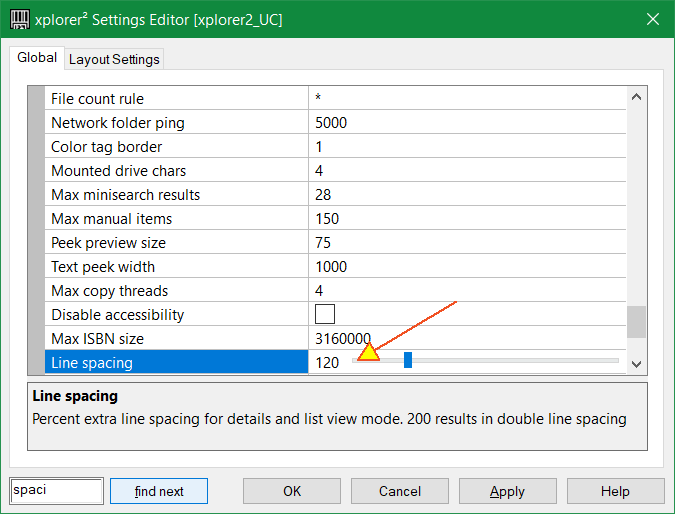
can any body else see the "star folder" icon problem or is it just in ireland? You need to increase line spacing from Advanced options:
-
Gandolf
- Gold Member

- Posts: 575
- Joined: 2004 Jun 12, 10:47
Re: xplorer2 v6.107 beta
It's the Tuath Dé that cause it.
-
Kilmatead
- Platinum Member
- Posts: 4879
- Joined: 2008 Sep 30, 06:52
- Location: Baile Átha Cliath
Re: xplorer2 v6.107 beta
See, the thing about them is that they were looking for a "most august and serious" way to announce their presence to the modern world (as befits their protean royal backgrounds), but they made a mistake and accidentally created that FreeSat channel that plays nothing but bad Christmas romance films 20 hours a day for the whole six months up to the day itself, where half-pretty girls fall for wishy-washy princes of questionably foreign lands where everyone speaks with English accents for some reason.
'Tis the plague for the insomniacs of the age.
After that débâcle, they fore-swore computers and all electronics for another few centuries until the humans were truly ready to accept them in a more natural form.
They just don't "do" blue stars.
'Tis the plague for the insomniacs of the age.
After that débâcle, they fore-swore computers and all electronics for another few centuries until the humans were truly ready to accept them in a more natural form.
They just don't "do" blue stars.
-
hajubu
- Member

- Posts: 20
- Joined: 2016 Aug 25, 06:40
Re: xplorer2 v6.107 beta
hi, there
I see the distortion for the drive icons (same effect), TOO
( independent from the line spacing 100,120,...--200)
I see the distortion for the drive icons (same effect), TOO
( independent from the line spacing 100,120,...--200)
-
nikos
- Site Admin
- Posts: 16401
- Joined: 2002 Feb 07, 15:57
- Location: UK
Re: xplorer2 v6.107 beta
do you mean FOLDER icons? And the current version 6.105 (not the beta) works ok?
-
hajubu
- Member
- Posts: 20
- Joined: 2016 Aug 25, 06:40
Re: xplorer2 v6.107 beta
i was referencing to the Icons ( Drive Bar) Drive icons only.
This distortion and/or clipping occurs before 6.105 also.
If of interest , I can go back for older version also, but I believe we should solve actual things first.
It is also a minor problem at all.
... good luck ...
This distortion and/or clipping occurs before 6.105 also.
If of interest , I can go back for older version also, but I believe we should solve actual things first.
It is also a minor problem at all.
... good luck ...
-
Kilmatead
- Platinum Member
- Posts: 4879
- Joined: 2008 Sep 30, 06:52
- Location: Baile Átha Cliath
Re: xplorer2 v6.107 beta
I'm confused... what distortion/clipping? If you're referring to how thin the little bars are above the icons, that's how it's supposed to look (unfortunately), not a bug. If you're talking about the drivebar screenshots I provided above, that is.
If yours look different, please provide a screenshot for clarity.
-
hajubu
- Member
- Posts: 20
- Joined: 2016 Aug 25, 06:40
Re: xplorer2 v6.107 beta
... as said before ...
it's a minor problem !
... and the little bars above or below the drive icons may stay as is there are ...
we shoud'nt blow up the story.

it's a minor problem !
... and the little bars above or below the drive icons may stay as is there are ...
we shoud'nt blow up the story.
Last edited by hajubu on 2025 Jun 27, 13:15, edited 1 time in total.
-
hajubu
- Member
- Posts: 20
- Joined: 2016 Aug 25, 06:40
Re: xplorer2 v6.107 beta
here what my drive icons look like
[removed]
PS. - this is x2 v6.107 / W11.64 26100.4484
and the Icon "star-group (377) " in x2 => [removed]
[removed]
PS. - this is x2 v6.107 / W11.64 26100.4484
and the Icon "star-group (377) " in x2 => [removed]
Last edited by hajubu on 2025 Jul 12, 15:22, edited 3 times in total.