here what my drive icons look like
[removed]
xplorer2 v6.107 beta
Moderators: fgagnon, nikos, Site Mods
-
hajubu
- Member

- Posts: 20
- Joined: 2016 Aug 25, 06:40
Re: xplorer2 v6.107 beta
Last edited by hajubu on 2025 Jul 12, 15:23, edited 1 time in total.
-
nikos

- Site Admin

- Posts: 16401
- Joined: 2002 Feb 07, 15:57
- Location: UK
Re: xplorer2 v6.107 beta
that looks normal for windows 11
-
Kilmatead
- Platinum Member

- Posts: 4879
- Joined: 2008 Sep 30, 06:52
- Location: Baile Átha Cliath
Re: xplorer2 v6.107 beta
Did Win11 break everything it could? No wonder no one wants it.nikos wrote: that looks normal for windows 11

Or icons 30-32 in the x2 resources. It's the same one Explorer uses for "Quick Access". We just don't know why it's wantonly attacking my folders (and apparently only mine?) with wild aplomb.hajubu wrote: and the Icon "star-group (377) " in x2

-
hajubu
- Member
- Posts: 20
- Joined: 2016 Aug 25, 06:40
Re: xplorer2 v6.107 beta
hi, I'm sure you checked if a the reg.entry like: (shell icons) exists. --> i.e. :
"Computer\HKEY_LOCAL_MACHINE\SOFTWARE\Microsoft\Windows\CurrentVersion\Explorer\Shell icons"
If exists and contains named entries like aspecific number, type, pathtoicons i.e.
"3 REG_SZ pathtonewfoldericons" (your wanted folder icon symbol)
or as I remember for removing overlays i.e. UAC or link-arrow e.g [77 REG_SZ c:\windows\blank.ico , 0] and
shortcut-overlay was [29 REG_SZ c:\windows\blank.ico} BLANK.ICO == clean-and-sober.ico
you may test to "reset" those i.e. save reg-entry "Shell Icons" to a backup.reg and delete then this entry.
Restart explorer.
P.S. think also if exists :: Computer\HKEY_CLASSES_ROOT\lnkfile = Windows-Links
and Computer\HKEY_CLASSES_ROOT\piffile = old_dos-links
and also ?? ... deleting (hidden) %localappdata%\iconCache.db --> restart
b.r.
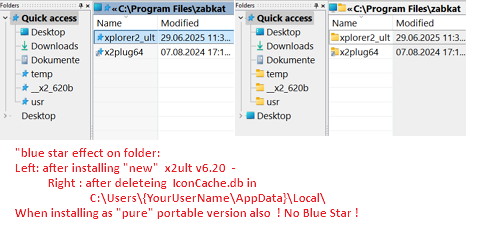
Here my experience with "BlueStar" effects -
- after installing "new" v6.20 and
- getting it "repaired" by deleting the "\iconCache.db"
"Computer\HKEY_LOCAL_MACHINE\SOFTWARE\Microsoft\Windows\CurrentVersion\Explorer\Shell icons"
If exists and contains named entries like aspecific number, type, pathtoicons i.e.
"3 REG_SZ pathtonewfoldericons" (your wanted folder icon symbol)
or as I remember for removing overlays i.e. UAC or link-arrow e.g [77 REG_SZ c:\windows\blank.ico , 0] and
shortcut-overlay was [29 REG_SZ c:\windows\blank.ico} BLANK.ICO == clean-and-sober.ico
you may test to "reset" those i.e. save reg-entry "Shell Icons" to a backup.reg and delete then this entry.
Restart explorer.
P.S. think also if exists :: Computer\HKEY_CLASSES_ROOT\lnkfile = Windows-Links
and Computer\HKEY_CLASSES_ROOT\piffile = old_dos-links
and also ?? ... deleting (hidden) %localappdata%\iconCache.db --> restart
b.r.
Here my experience with "BlueStar" effects -
- after installing "new" v6.20 and
- getting it "repaired" by deleting the "\iconCache.db"