I have experimented with several PDF narive-previewer programs for Xplorer2.
The one I prefer is PDFXchange because I can Zoom in and out on the preview, and scroll up and down the whole document.
After my latest experiment with an alternative I have not been able to get X2 to revert to using the PDFXchange native-previewer.
I have tried uninstalling and reinstalling each and both programs in different orders, and still not get what I want.
To help my investigations I would like to know which native-previewer that X2 is currently using.
Can this be done?
which native-preview program is x2 using
Moderators: fgagnon, nikos, Site Mods
-
mjbrookes
- Bronze Member

- Posts: 124
- Joined: 2007 Sep 19, 11:24
-
astewart
- Member

- Posts: 37
- Joined: 2011 May 12, 00:20
Re: which native-preview program is x2 using
You may need to re-register PDFX. I use a batch file "PDFX_reregister.bat"
and restart x2.regsvr32 "C:\Program Files\Tracker Software\Shell Extensions\XCShInfo.x64.dll"
regsvr32 "C:\Program Files\Tracker Software\Shell Extensions\XCShInfo.x86.dll"
-
mjbrookes
- Bronze Member
- Posts: 124
- Joined: 2007 Sep 19, 11:24
Re: which native-preview program is x2 using
Thanks for your suggestion,
unfortunately, I was not clever enough to make it work
If I get frustrated enough I can reset and rebuild from Windows ( I am quite good at that) but that seems dramatic just to make X2 choose which native previewer to use.
unfortunately, I was not clever enough to make it work
If I get frustrated enough I can reset and rebuild from Windows ( I am quite good at that) but that seems dramatic just to make X2 choose which native previewer to use.
-
nikos

- Site Admin

- Posts: 16401
- Joined: 2002 Feb 07, 15:57
- Location: UK
Re: which native-preview program is x2 using
try the following:
1. uninstall xplorer2 "ebook filter" (i take it that's the one you don't like)
2. reinstall pdf xchange
3. reboot
if you manage to get pdf xchange back, please try this "beta" version:
https://www.zabkat.com/test/xplorer2_se ... t_beta.exe
it has a new advanced option you should tick as below:
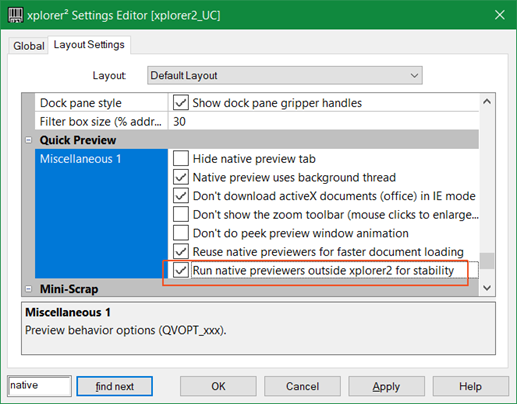
it is my last effort to fix pdf xchange and latest MS office preview crashes
1. uninstall xplorer2 "ebook filter" (i take it that's the one you don't like)
2. reinstall pdf xchange
3. reboot
if you manage to get pdf xchange back, please try this "beta" version:
https://www.zabkat.com/test/xplorer2_se ... t_beta.exe
it has a new advanced option you should tick as below:
it is my last effort to fix pdf xchange and latest MS office preview crashes
-
mjbrookes
- Bronze Member
- Posts: 124
- Joined: 2007 Sep 19, 11:24
Re: which native-preview program is x2 using
Hi Nikos,
I had forgotten that the Ebook add-in was a separate "app" in Settings > Apps >Installed Apps so when I did my uninstalls & reinstalls of X2 and PDFX the Ebook-add-in stayed installed.
Thanks for the help, now having uninstalled the Ebook app and X2 and PDFX I have the native preview back the way I prefer.
It is also possible that the other 're-registering' suggestion would have worked if I had previously uninstalled Ebook-add-in.
There was nothing wrong with the Ebook-Previewer when I tested it; simply - I rely on the extra features provided by the PDFx native preveiwer.
As an Idea, would it be easy to change the title of the preview window?
currently it says "Preview"
Idea = to say "Preview - Native preview by {PDFXchange}{sumatraPDF}{Ebook-addIn}{etc]{etc}
I had forgotten that the Ebook add-in was a separate "app" in Settings > Apps >Installed Apps so when I did my uninstalls & reinstalls of X2 and PDFX the Ebook-add-in stayed installed.
Thanks for the help, now having uninstalled the Ebook app and X2 and PDFX I have the native preview back the way I prefer.
It is also possible that the other 're-registering' suggestion would have worked if I had previously uninstalled Ebook-add-in.
There was nothing wrong with the Ebook-Previewer when I tested it; simply - I rely on the extra features provided by the PDFx native preveiwer.
As an Idea, would it be easy to change the title of the preview window?
currently it says "Preview"
Idea = to say "Preview - Native preview by {PDFXchange}{sumatraPDF}{Ebook-addIn}{etc]{etc}
-
nikos
- Site Admin
- Posts: 16401
- Joined: 2002 Feb 07, 15:57
- Location: UK
Re: which native-preview program is x2 using
to see which previewer is used, try this tool: www.zabkat.com/blog/chkshxt-shell-extension-dump.htm
-
mjbrookes
- Bronze Member
- Posts: 124
- Joined: 2007 Sep 19, 11:24
Re: which native-preview program is x2 using
Thank you Nikos,
chkshxtGUI.zip was simple to use, and gave enough clues to see what native-preview was in use.
In future if I hit preview problems:-
* I can use chkshxtGUI.exe,
* and if needed, the use the help from astewart to revert to the Tracker/PDFXchange preview.
* and then, if needed, use the new advanced options setting > Quick Preview > Run outside Xplorer2
SO:-
To answer my original query .....
I am currently using Tracker/PDFXchange preview,
chkshxtGUI.zip
Shell extension information for .pdf ...
1. TEXT FILTER -----------------
(nothing registered)
2. PROPERTY HANDLER ------------
(nothing registered)
3. PREVIEW HANDLER -------------
X64: C:\Program Files\Tracker Software\Shell Extensions\XCShInfo.x64.dll v10.6.1.397 {9B68BDF7-95F9-4A1F-851C-27D822F8E3E9}
X32: C:\Program Files\Tracker Software\Shell Extensions\XCShInfo.x86.dll v10.6.1.397 {9B68BDF7-95F9-4A1F-851C-27D822F8E3E9}
4. THUMBNAIL PROVIDER ----------
X64: C:\Program Files\Tracker Software\Shell Extensions\XCShInfo.x64.dll v10.6.1.397 {644D29FB-8692-49A6-B37D-D11A4CCC7A6D}
X32: C:\Program Files\Tracker Software\Shell Extensions\XCShInfo.x86.dll v10.6.1.397 {644D29FB-8692-49A6-B37D-D11A4CCC7A6D}
chkshxtGUI.zip was simple to use, and gave enough clues to see what native-preview was in use.
In future if I hit preview problems:-
* I can use chkshxtGUI.exe,
* and if needed, the use the help from astewart to revert to the Tracker/PDFXchange preview.
* and then, if needed, use the new advanced options setting > Quick Preview > Run outside Xplorer2
SO:-
To answer my original query .....
I am currently using Tracker/PDFXchange preview,
chkshxtGUI.zip
Shell extension information for .pdf ...
1. TEXT FILTER -----------------
(nothing registered)
2. PROPERTY HANDLER ------------
(nothing registered)
3. PREVIEW HANDLER -------------
X64: C:\Program Files\Tracker Software\Shell Extensions\XCShInfo.x64.dll v10.6.1.397 {9B68BDF7-95F9-4A1F-851C-27D822F8E3E9}
X32: C:\Program Files\Tracker Software\Shell Extensions\XCShInfo.x86.dll v10.6.1.397 {9B68BDF7-95F9-4A1F-851C-27D822F8E3E9}
4. THUMBNAIL PROVIDER ----------
X64: C:\Program Files\Tracker Software\Shell Extensions\XCShInfo.x64.dll v10.6.1.397 {644D29FB-8692-49A6-B37D-D11A4CCC7A6D}
X32: C:\Program Files\Tracker Software\Shell Extensions\XCShInfo.x86.dll v10.6.1.397 {644D29FB-8692-49A6-B37D-D11A4CCC7A6D}
-
mjbrookes
- Bronze Member
- Posts: 124
- Joined: 2007 Sep 19, 11:24
Re: which native-preview program is x2 using
Hi Nikos,nikos wrote: 2025 Aug 07, 13:20
it has a new advanced option you should tick as below:
it is my last effort to fix pdf xchange and latest MS office preview crashes
FYI your new advanced settings in the latest version seem to have cured my PDFXchange native preview problems.
1) thanks
2) long may it continue

-
nikos
- Site Admin
- Posts: 16401
- Joined: 2002 Feb 07, 15:57
- Location: UK