I see some old topic about using "Title Case" but nothing new.
I've a bunch of music folders with a mish-mash of 'case' conventions - some are all lower case, some mixed CAPITALS and lower case, etc etc. I'd rather like - from an aesthetic perspective, nothing else - to have them all in proper Title Case - and when I say 'proper' I suggest that the important words would be in Title case but the unimportant ones - the 'and' and 'of' in all lower case.
I'm sure this is hard. Has such a renaming convention/utility been done anywhere?
Thanks Richard
Title case
Moderators: fgagnon, nikos, Site Mods
-
nikos

- Site Admin

- Posts: 16423
- Joined: 2002 Feb 07, 15:57
- Location: UK
Re: Title case
mass rename wizard has some modes that change the case, so you can first turn everything in lowercase and then perhaps use camelCase which replaces spaces with capitalization (but spaces are gone)
that's all you can do within xplorer2
that's all you can do within xplorer2
-
Kilmatead
- Platinum Member

- Posts: 4898
- Joined: 2008 Sep 30, 06:52
- Location: Baile Átha Cliath
Re: Title case
Short answer: Erm... well, maybe, kinda.

Long answer: Umm... well, kinda, maybe.

Most mass-renaming utilities will have multiple settings for case, but only in a general sense - capitalise each word, first-word-only, first-and-last, etc. This kind of thing is generic, and not especially aesthetically pleasing - those raised in an English-speaking milieu will have "a feeling" for what "looks" right, even if they themselves don't know all the arcane rules the language actually employs for what we call Title-Case.
Juggling proper-nouns, adverbs, adjectives, prepositions, and all that lovely stuff we slept through in grammar-class is ultimately best done online (as titles require analysing, rather than simple blunt-force-trauma). For example, using the Title Case Converter via a web-page is easy - you give it a sentence, and it spits it back at you all cleaned up. While this is great for 1 or 2 lines, unfortunately, this is difficult to apply into a mass-approach where you can have thousands of titles to fix.
The manual-approach using 3rd-party renamers (just my favourite, but there are many to choose from) usually entails first capitalising every word, and then applying filtering techniques (with regex if adventurous) to target individual words ("the, of, or, and...") being careful not to change the first or last words of the title itself, and modifying accordingly.
A slightly more automated approach has been long in use for people who manage their music collections with all the OCD only a thousand insane gods could muster. This involves more complex tools like Picard which (if configured properly) can go through the meta-data of the tracks en-masse and look them up on different music services to get "official" titles, apply them back to the tracks and (depending on what you use) re-modify the underlying filenames to match the new meta-data tags.
In other words, there's no simple one-stop-shop for "proper" title-casing, especially when you're working with file/folder names. In can be done, but it requires time and effort and a month of rainy-Sundays before you're happy.
While it would be wonderful if someone would integrate the online Title-Case-Converter API (yes, it has one!) with a simple mass-renamer, the trouble is their service and the use of this API is not free, so the drawbacks are obvious.
The simplest suggestion is to use the manual-approach above: find a renaming tool that has a setting for "every word" (almost all of them do), and work your way down from there. (The one I linked above can "layer" multiple bespoke naming rules on top of one another, so you can spend a lot of time adding, tweaking, and previewing before actually messing anything up. And then save the rules for latter application.)
As per Nikos' suggestion, if anyone, anywhere, in the whole sordid history of human misery and lusty dissolution ever managed to come up with a true and practical use for Camel-f-ing-Case and its derivatives, I have yet to see it attract anyone other than the sorriest barflies of cruft at the end of long night of worse-for-wear taverning.
My tuppence-worth.

-
rnmerchant
- Member

- Posts: 49
- Joined: 2020 Nov 23, 01:20
Re: Title case
Thanks for the help with this. Nice detail! I like Renamer too.
I asked Perplexity for help with this. It suggested a couple of things including using a Powershell script. After a couple of iterations it actually worked pretty well as far as I can tell - at the very least I noticed nothing unexpected... I've never previously used an AI app to do this sort of thing so I am somewhat impressed with myself!
I've posed the text containing the script in case anyone else wants to test it.
Can such things be somehow built in to Xplorer2 ? I don't know how plugins or such things work (nor do I really want to know the sordid details).
Richard
# List of short words to keep lowercase (unless first or last)
$smallWords = @(
'a','an','and','as','at','but','by','for','from',
'in','into','nor','of','on','onto','or','over',
'per','the','to','up','vs','via','with'
)
function Convert-ToStrictTitleCase {
param(
[Parameter(Mandatory=$true)]
[string]$InputString
)
# Normalize whitespace and lowercase everything first
$words = $InputString.Trim() -split '\s+'
if ($words.Count -eq 0) { return $InputString }
for ($i = 0; $i -lt $words.Count; $i++) {
$word = $words[$i].ToLower()
$isFirst = ($i -eq 0)
$isLast = ($i -eq $words.Count - 1)
if (-not $isFirst -and -not $isLast -and $smallWords -contains $word) {
# Keep designated small words lowercase in the middle
$words[$i] = $word
}
else {
# Capitalize first letter, keep rest lowercase
if ($word.Length -gt 1) {
$words[$i] = $word.Substring(0,1).ToUpper() + $word.Substring(1)
} else {
$words[$i] = $word.ToUpper()
}
}
}
return ($words -join ' ')
}
Get-ChildItem -Directory -Recurse |
ForEach-Object {
$newName = Convert-ToStrictTitleCase -InputString $_.Name
# If the name is already correct, skip
if ($_.Name -ceq $newName) { return }
# Work around Windows case-insensitivity: rename via a temporary name
$parent = Split-Path -Parent $_.FullName
$tempName = [Guid]::NewGuid().ToString()
$tempPath = Join-Path $parent $tempName
# First rename to a unique temporary name
Rename-Item -LiteralPath $_.FullName -NewName $tempName
# Then rename from the temporary name to the desired title-cased name
Rename-Item -LiteralPath $tempPath -NewName $newName
}
I asked Perplexity for help with this. It suggested a couple of things including using a Powershell script. After a couple of iterations it actually worked pretty well as far as I can tell - at the very least I noticed nothing unexpected... I've never previously used an AI app to do this sort of thing so I am somewhat impressed with myself!
I've posed the text containing the script in case anyone else wants to test it.
Can such things be somehow built in to Xplorer2 ? I don't know how plugins or such things work (nor do I really want to know the sordid details).
Richard
# List of short words to keep lowercase (unless first or last)
$smallWords = @(
'a','an','and','as','at','but','by','for','from',
'in','into','nor','of','on','onto','or','over',
'per','the','to','up','vs','via','with'
)
function Convert-ToStrictTitleCase {
param(
[Parameter(Mandatory=$true)]
[string]$InputString
)
# Normalize whitespace and lowercase everything first
$words = $InputString.Trim() -split '\s+'
if ($words.Count -eq 0) { return $InputString }
for ($i = 0; $i -lt $words.Count; $i++) {
$word = $words[$i].ToLower()
$isFirst = ($i -eq 0)
$isLast = ($i -eq $words.Count - 1)
if (-not $isFirst -and -not $isLast -and $smallWords -contains $word) {
# Keep designated small words lowercase in the middle
$words[$i] = $word
}
else {
# Capitalize first letter, keep rest lowercase
if ($word.Length -gt 1) {
$words[$i] = $word.Substring(0,1).ToUpper() + $word.Substring(1)
} else {
$words[$i] = $word.ToUpper()
}
}
}
return ($words -join ' ')
}
Get-ChildItem -Directory -Recurse |
ForEach-Object {
$newName = Convert-ToStrictTitleCase -InputString $_.Name
# If the name is already correct, skip
if ($_.Name -ceq $newName) { return }
# Work around Windows case-insensitivity: rename via a temporary name
$parent = Split-Path -Parent $_.FullName
$tempName = [Guid]::NewGuid().ToString()
$tempPath = Join-Path $parent $tempName
# First rename to a unique temporary name
Rename-Item -LiteralPath $_.FullName -NewName $tempName
# Then rename from the temporary name to the desired title-cased name
Rename-Item -LiteralPath $tempPath -NewName $newName
}
-
Kilmatead
- Platinum Member
- Posts: 4898
- Joined: 2008 Sep 30, 06:52
- Location: Baile Átha Cliath
Re: Title case
Not a bad approach (though Nikos is wetting his pantaloons as we speak at his impending antiquity), yet I can't help but think that "Louis XVI's Lute-based remix of Henry VIII's Greensleeves.mp3" may not turn out quite the way the original author hoped. Then again, neither did his line of custom-fit neck-ties.rnmerchant wrote: 2026 Mar 19, 23:23 I've never previously used an AI app to do this sort of thing so I am somewhat impressed with myself!
That said, Roman numerals are always the first victim of any fly-by-night script, so a decent first result. Personally, I prefer the renaming-utility integration if for no other reason than the ability to preview the results - I've never liked running "blind scripts", even when I'm the poor sod who wrote them.
 (To be fair, it would be easy enough to modify your script to at least generate a text-file preview first, since all the strings are already there.)
You can always run any powershell script from a user-command, though this one would need the be modified for accepting outside arguments instead of reading the tree directly (flatten-folders, select, run, or some variant thereof). As I do not use powershell (call me a luddite), I can't help with this, but there are plenty of other users who would know the score - or, maybe AI homework? We all need higher electric bills, to be sure.rnmerchant wrote: 2026 Mar 19, 23:23 Can such things be somehow built in to Xplorer2 ? I don't know how plugins or such things work
Again, as almost all 3rd-party renaming tools allow for arguments, direct previews, and visual x2 integration, the old-fashioned way has its charms, if being a little more work.
(For example, I "wasted?" half the evening layering a few regex-rules atop a base cleanup rule in Renamer to accomplish much the same thing, but I do that sort of thing just for fun every night anyway, so the rest is all edge-cases.)In any event, you can appreciate why the online-analysis approach works better - though if you really wanted to give Perpelexity a workout you could get carried away creating a properly grammar-oriented thing, instead of our dry off-line approximations.

À propos de rien, I once used one of those "where was this picture taken" AI things on an album cover only to discover that it was only a composite photo and that unfortunately no one had yet erected such a poignant statue directly in front of a Caracas favela as I, in my armchair-revolutionary zeal, had once fervently hoped.


Nice composite, though.
-
nikos
- Site Admin
- Posts: 16423
- Joined: 2002 Feb 07, 15:57
- Location: UK
Re: Title case
I made a note to look into "title case" rename for next version, although it won't cater for roman numerals, common articles and other complexities
-
rnmerchant
- Member
- Posts: 49
- Joined: 2020 Nov 23, 01:20
Re: Title case
Thanks Nikos. It would be nice to have, I think. I asked for the script for folders so I don';t know whether it works on files (haven't tried it)...
Kilmatead, can you post your 'regex' for Renamer as that is a program I like too. Presumably it works on files as I don't think renamer works on folders...
Kilmatead, can you post your 'regex' for Renamer as that is a program I like too. Presumably it works on files as I don't think renamer works on folders...
-
Kilmatead
- Platinum Member
- Posts: 4898
- Joined: 2008 Sep 30, 06:52
- Location: Baile Átha Cliath
Re: Title case
I suppose, for clarity, I should give a full explanation:rnmerchant wrote: 2026 Mar 20, 15:28 Kilmatead, can you post your 'regex' for Renamer as that is a program I like too. Presumably it works on files as I don't think renamer works on folders...
I use the "portable" version of ReNamer, so it can be placed anywhere... I have created a user-command which I use as a toolbar button defined thusly:
> "C:\Users\Kilmatead\Shite_1\ReNamer\ReNamer.exe" /list "$>"
With this, you can select any number of files and folders and just transfer them directly into ReNamer with one click.
In the ReNamer folder there should be a sub-folder called "Presets" (if not, just create one there). Download this preset file for Title Case and extract it into that folder (the file has an .mp extension, but it's just a plain text file).
In the main menu it will appear under the Presets -> Load submenu, just select it, et voilà, what started out as cold canned spaghetti is instantly transformed into something... slightly more palatable.
On the left, for testing I just used a bunch of unimaginative Shakespeare quotes of no case (the top two are folders, just to show it works for them too), so when the preset is applied you get (on the right) what the end result will be:
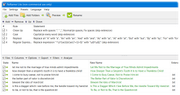
As you can see from the screenshot, the preset is actually a combination of 4 filters, one to "clean up" the names a bit, another to capitalise the first letter of each, the next replaces all instances of your word list ("and, the, of", etc) with lower-case, and the last is the regex which re-capitalises the first and last words of each name just in case they were caught up in the lower-case word list.
There may be a better way to do this, but I was high on sugar when I whipped this up, and it just works - plus, as a preset it's available anytime. You can double-click on any of the rules to see what their settings are and change them if you prefer something else, or add/delete others.
Yes, I know this explanation is long-winded, but just in case others in the audience are interested it was easier to give complete instructions (for example the user-command may not be immediately obvious to most people).
Plus, it's a fun introduction to layering rules for complex transformations with this tool.
-
nikos
- Site Admin
- Posts: 16423
- Joined: 2002 Feb 07, 15:57
- Location: UK
Re: Title case
I bet you are the only person in the world who knows of (never mind uses) the $> token
-
Kilmatead
- Platinum Member
- Posts: 4898
- Joined: 2008 Sep 30, 06:52
- Location: Baile Átha Cliath
Re: Title case
It was my idea, after all - and after all the trouble I had whacking you over the head with a Toblerone, tying you up, dragging you into the jungle and suspending you over a man-eating ant-hill to convince you to add the bleedin' thing, you're bloody right I'm gonna use it!
(Not that even after 15 years did you think of adding it to the horrible help-modal-popup for $-tokens, either. Big help you are. To the ants with ye!)
(Not that even after 15 years did you think of adding it to the horrible help-modal-popup for $-tokens, either. Big help you are. To the ants with ye!)
-
nikos
- Site Admin
- Posts: 16423
- Joined: 2002 Feb 07, 15:57
- Location: UK
Re: Title case
sir, i am spoiling your paddy @rse big time
-
Kilmatead
- Platinum Member
- Posts: 4898
- Joined: 2008 Sep 30, 06:52
- Location: Baile Átha Cliath
Re: Title case
Little known fact: it's actually considered rude to say "sir" to the Irish, as that's a distinctly British appellation, and, you know, having 800 years of colonial-crap jammed up their paddy-@rses makes 'em kinda grumpy.
Americans get caught out by this all the time, as they think they're being polite! Hah! Only the rude shall survive.
Americans get caught out by this all the time, as they think they're being polite! Hah! Only the rude shall survive.
-
Brig
- Silver Member

- Posts: 233
- Joined: 2002 Aug 05, 16:01
- Location: Michigan
Re: Title case
Very nice! This will come in quite handy with mp3s. Looking forward to testing it out (and seeing if you really know the capitalization rulesKilmatead wrote: 2026 Mar 20, 17:05 .....
I suppose, for clarity, I should give a full explanation:
.....
).-
Kilmatead
- Platinum Member
- Posts: 4898
- Joined: 2008 Sep 30, 06:52
- Location: Baile Átha Cliath
Re: Title case
If you read the posts above in this thread, you'll see that this is only a "poor man's approach" to a superficial Title-Case solution: it will not stand up to grammatical scrutiny of any kind.
It doesn't promise to be anything else. If you need absolutely accurate Title casings and want something at least vaguely authoritative to "back it up", please refer back to the online tools like (above) the Title Case Converter. That can provide a choice of publisher-styles to use, plus a word-by-word rationalisation for each decision it returns.
The renamer preset I provided above is only a quick-and-dirty solution. Like my father used to say when I was a kid, we had what he called "a 25 mile-per-hour lawn" - meaning if you drove by the front of the house at 25mph or faster, it looked "just fine" and that was all you needed.
If, however, you drove by slowly, like the gangsters-of-old do in the movies, fedoras on display when casing-the-joint (no pun intended), the lawn begins to reveal its secrets: weeds, bare-spots, and the general discolourations that most lawns have when their owners don't suffer from a predilection for astute watering - or the pretentious faux-OCD middle-class housewives pretend when they begin to dream hopelessly above their stations.
That's all this is: quick and dirty. That's: Quick. And dirty. A 25mph solution.
Geddit, Bugsy? Just makin' sure we're on the same page so the boss don't start wondering who blew up this here racket, see? I don't wanna hear no complaints from the boys downtown when it all goes South.
-
pj
- Gold Member

- Posts: 519
- Joined: 2006 Jan 26, 14:01
- Location: Florida
Re: Title case
Because the "help" screen on the mass renamer dialog doesn't show that option, or several others.
You have a comprehensive table in the online help, perhaps you could display that table when the "$-token help" button is pressed, which would then include the following useful options:
- $> Like $A but selected fullpaths are saved to the list file
%TEMP%\x2tmpList.txt and this file is used as argument - $nn Automatically incremented counter starting from number nn
Possible counter formats are $1 for the sequence 1,2,...
$001 for 001,002,..., $5 for 5,6,... and so on (called $# in the "help" table, but the explanation is crappy) - $[s:l] Extract part of the filename starting at s and for l letters
$[4:3] will extract 3 letters starting from character 4
Use a negative start to count from the end of the name - All the useful examples from the on-line help table
- $f, $n, etc. Lowercase characters getting 8.3 format
- ${column names}
=========================
pj in (20 years of xplorer2 and counting) FL