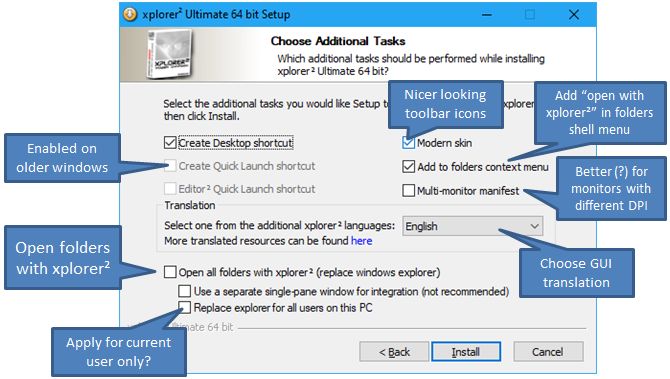
installer options
Moderators: fgagnon, nikos, Site Mods
-
nikos

- Site Admin

- Posts: 16401
- Joined: 2002 Feb 07, 15:57
- Location: UK
installer options
in case you're wondering what all the little checkboxes are about
-
pj
- Gold Member

- Posts: 518
- Joined: 2006 Jan 26, 14:01
- Location: Florida
Re: installer options
Multi-monitor manifest:
x2 v. 4.2.0.0. on Win 7 HP, 64 bit.
So I had an issue with the positions of dialog boxes, like the User Commands ORGANIZE dialog.
Using the menus Customize/User Commands/Organize, the User Commands ORGANIZE dialog box pops up at 883,242, roughly the middle of the location of x2's main windows.
If I do the same thing via a macro assigned to a toolbar button using the COMMAND keycode, the dialog box is outside the range of both monitors! I had to use a Nirsoft tool, GUIPropView, to find it's x-y location is 4170,242. Using alt-space/Move function I could move it back onto a visible monitor.
After writing the above and saving the draft, I saw 4.2.0.1 was released with a note to use the Multiple Monitors manifest to fix some problems.
Installed 4.2.0.1 and the dialog box comes up in the same location using the menus, but the toolbar macro now opens the dialog box at the far rightmost position on the rightmost monitor and still be visible.
Definitely an improvement over being totally off-screen, but puzzling that the dialog opens in a different location depending on HOW I open it.
It's no longer a "bug" since I can now see it when it opens, but very curious.
Anyway, thanks for fixing this problem!
---------------------------------------------
PJ
x2 v. 4.2.0.0. on Win 7 HP, 64 bit.
So I had an issue with the positions of dialog boxes, like the User Commands ORGANIZE dialog.
Using the menus Customize/User Commands/Organize, the User Commands ORGANIZE dialog box pops up at 883,242, roughly the middle of the location of x2's main windows.
If I do the same thing via a macro assigned to a toolbar button using the COMMAND keycode, the dialog box is outside the range of both monitors! I had to use a Nirsoft tool, GUIPropView, to find it's x-y location is 4170,242. Using alt-space/Move function I could move it back onto a visible monitor.
After writing the above and saving the draft, I saw 4.2.0.1 was released with a note to use the Multiple Monitors manifest to fix some problems.
Installed 4.2.0.1 and the dialog box comes up in the same location using the menus, but the toolbar macro now opens the dialog box at the far rightmost position on the rightmost monitor and still be visible.
Definitely an improvement over being totally off-screen, but puzzling that the dialog opens in a different location depending on HOW I open it.
It's no longer a "bug" since I can now see it when it opens, but very curious.
Anyway, thanks for fixing this problem!
---------------------------------------------
PJ
-
nikos
- Site Admin
- Posts: 16401
- Joined: 2002 Feb 07, 15:57
- Location: UK
Re: installer options
can you give me a specific example of what kind of macro opens the dialog not centered on xplorer2? Please state the complete code you use for it
-
pj
- Gold Member
- Posts: 518
- Joined: 2006 Jan 26, 14:01
- Location: Florida
Re: installer options
COMMAND 33002
-------------------------
PJ in (K.I.S.S.) FL
-------------------------
PJ in (K.I.S.S.) FL
-
nikos
- Site Admin
- Posts: 16401
- Joined: 2002 Feb 07, 15:57
- Location: UK
Re: installer options
edit the macro adding this line first:
NOPOPUPS 0
NOPOPUPS 0