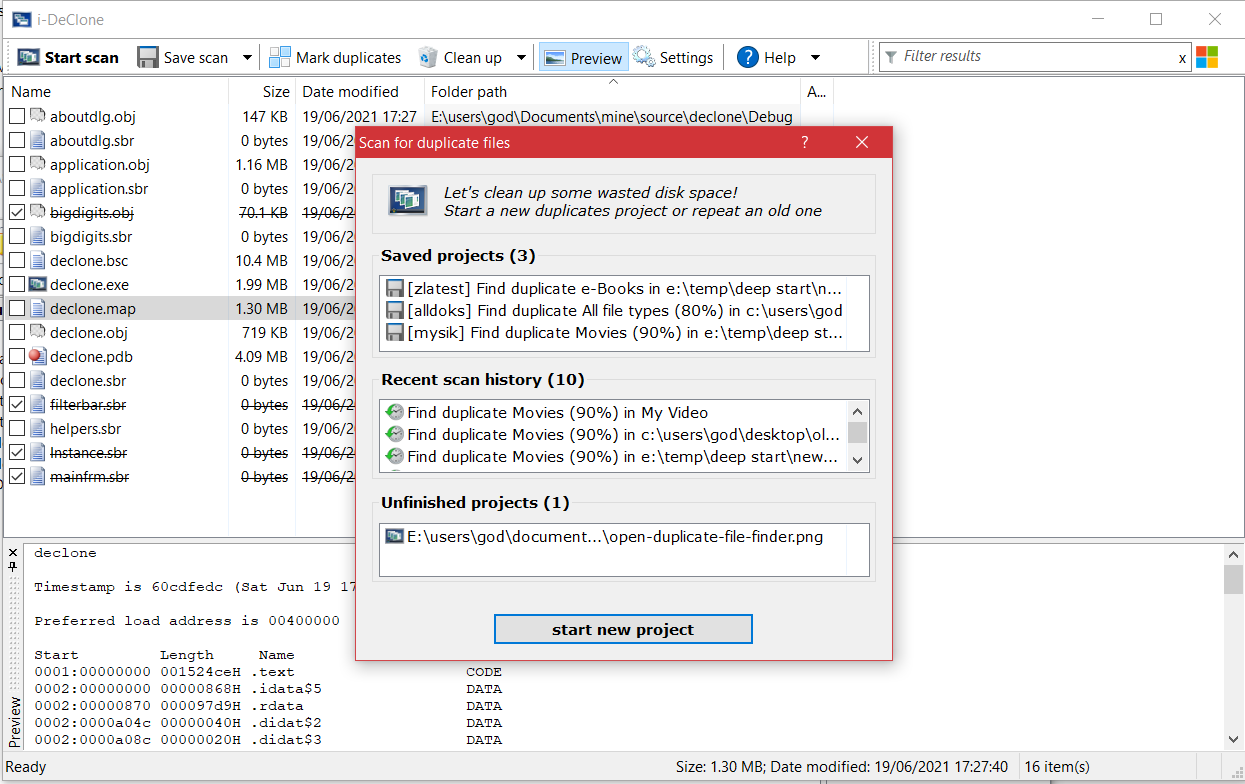
For some time now I'm working on a new project and I now have the urge to get some feedback on it.
It is a specialized tool to search and destroy duplicate and near-duplicate files of various types that junk up your PC and phone
it is meant to be user friendly and "self evident", that's why I intentionally tell you NOTHING about how it works.
See if you can figure it out yourselves, there are popup explanations if you look around in the GUI
At present it does nothing, sorry about that, but the gui is "as if" it was a fully functional tool. I would appreciate your feedback, either a simple yea or nay, or more details. Especially if you already use some other similar program
thanks!
DOWNLOAD declone alpha version (700kb) no installer, just unpack and run
ps. if somebody has windows 7 can you try adding a mobile phone to be scanned?
I've just found this post. I've got it downloaded and I've got several hundred MB of music files to go through with definite duplicates in hte mix. It'll be interesting to see what it does.
I plan to start small, with directories only totaling a few hundred files, but when I go whole hog it will be looking at well over 8000 files - almost all of which are FLAC encoded music files.
My normal scan is to find jpeg's of same size and content. I'd be interested in the speed and how declone outputs the display. User interface looks clean and obvious.
OK, I enabled the dark mode and set the settings to use a settings file currently, all looks good.
Just one question: When using a dialog like Add folder - can we have a more robust Explorer-based lookup? The old interface for finding folders is a PITA because I have to drill down through all the parent folders to find mine, whereas with an explorer-style interface, I could paste the exact path directly, saving me a lot of time....
this is the standard "folder chooser" dialog, but you can also drag-drop folders from xplorer2 without clicking ADD on the toolbar
see the hint text in the list control, it's all there
When "Find exact duplicates only" is selected, I thought that would mean 100% content match, but I see that you need to also need to check "Compare file content (slower)" on the advanced tab in order to get an exact match on content.
Does anyone else find that a bit non-intuitive? That might need some explanation in the help or something.
Looking forward to seeing how the "Mark Duplicates" tab works when it is implemented.
exact search by default compares name/size/date (you can add/remove more properties to taste)
usually if all these match, the content is also the same, so you can discover the duplicates at a fraction of the time without actually checking contents
depending on the scan type, extra properties are also checked (if not content), so for example for music duration is checked too, so it is yet another security so to speak
at any rate you can tick content if you wish and don't mind the wait
Since I've been here since your "flapper tune" I want to participate in your "swan song" as well.
Not much to contribute for the GUI. It is pretty straight forward. But I agree with lnbrantley. If you have the option "Find exact duplicates only" it can be a bit misleading if there is the (slight) possibility that a file that has for instance same size and date but some byte differs is shown as duplicate.
if the tool is to scan contents every time, the comparison will take ages
the checkbox is there for anybody that want to be double sure.
i plan to add a spot check where declone will scan some content at random if seeking "identity"
the problem i have in general is that the tool allows in expert mode people to change all the properties. So if somebody just leaves FILE SIZE for example as the rule for "identity", then declone will happily bunch together files that have same size and are otherwise unrelated. Just like x2
Could there be a sub menu option for content verification that is only enabled when Find exact duplicates only is selected in the radio button, and upon enabling that a big, fat popup warns the user that this will tremendously slow down the process, with an acknowledgement that they really want to do this, be done in some way, manner, or fashion?
I have a bad , bad habit of changing file dates and times to something even with my music collection - say, if I ripped 10 CDs today via FLAC, I make all of then with dates today (created and modified) and times 00:00:00 or 12:00:00. I'm ornery (and OCD) like that.
And with some bands I have multiple copies of their songs from different albums - Studio EP, compilation, Studio re-release with bonus tracks, etc - so songs will be the same repeatedly. With content they would still be different even if the physical track is identical, because the associated tags for each track instance would be different, so even if the size may end up identical, the content would prove otherwise.
I realize that this is both highly unlikely and a niche case - but I really would like to use content checking whenever I want ad hoc.