For "portable mode" /I:d:\Path\To\xp2Custom.INI my notes say:
Code: Select all
Rem xplorer2 ultimate first checks if there was a  settings file passed with the /I: command line option,
  Rem then     it           checks for the default settings file called x2settings.ini,
  Rem   first  in      the user appdata folder (shell:appdata),
  Rem   then   in      the installation folder.
  Rem If no settings file was found, the registry is used.
and
Code: Select all
Rem /I - (portable mode, non-ultimate) Initialize registry with a custom settings file.
  Rem The settings file should be in the same folder as xplorer² and be created with Actions | Extract settings on your "home" PC.
  Rem For ultimate version this can also be an INI file, bypassing the registry
To clear the ambiguity, what does "Initialize registry" mean for Ultimate versus non-ultimate? Does it mean "one-time import" so that the Ini overwrites registry data, or does it mean "read+write this Ini *instead of* touching registry"? What happens differently when next time xp2 is launched without /I:?
After reinstall with default choices, xp2 unexpectedly failed to find my settings. (Does the installer replace all registry data, or does it try to work with existing entries or Ini?)
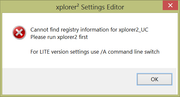
After exit, re-open with /I: (is this what you mean by portable mode?) found the settings, and crumbbar was On. Tools -> Advanced settings failed to launch the settings editor. Except before using /I: the settings editor opened normally. Is the path or whatever to launch the editor stored in settings as well? Because that would explain it.
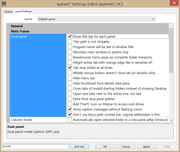
However now the settings editor changing "Don't use fancy path crumbs bar" makes no difference; xp2 displays the crumbbar properly regardless of the setting. To repeat, settings editor opens only manually not with Tools -> Advanced settings.
Do xp2 and the settings editor both follow the same logic about where to read+write their data? Because it's not obvious that they do. Can the editor take an argument /I:Custom.INI?
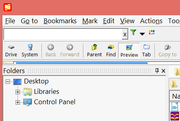
Also yes removing the manifest does indeed make the crumbbar go nearly invisible, and restoring it fixes that. This is not the only factor that affects crumbbar / addressbar position, because
Code: Select all
using custom  settings crumbbar / addressbar appears on a   seperate toolbar from Search but
using default settings crumbbar / addressbar appears on the same     toolbar as   Search.
After dorking around with inscrutable behavior for too long, the many logic paths stop making sense and become too curvy for their own good; one is forced to revert to v5.
If Registry is the default settings storage location, then staying away from "Initialize / portable mode" may work better.
The manual edits to make v5 settings carry correctly to v6 could be done in RegEdit. That will be tomorrow's project, after checking back to see if this more info here suggests a possible direction.
Also: reinstall; start xp2, Actions -> Export settings to Defaults.INI; prove that I can switch between default and custom settings by always using /I:; test whether settings editor updates make it out to any INI, or whether you have to start xp2 without /I: aka use registry, then export the updated setting to an INI.