drivebar and bookmarks

Discussion & Support for xplorer² professional

Moderators: fgagnon, nikos, Site Mods

rnmerchant
Member
Member
Posts: 38
Joined: 2020 Nov 23, 01:20

drivebar and bookmarks

Post by rnmerchant »

It occurred to me that the drivebar is an item that (on my system) has a lot of empty space.

Perhaps this could be enhanced in it's utility. I was imaging that perhaps the bookmarked items could be put there as icons. Currently I have to drop down the bookmarks list then move carefully to the one I want: why not a single click on the one I want...

I am aware by looking at the discussion that many don't use the drivebar but this might be a hangover from older resolution screens - with my 'highish' resolution monitors the bar does not take up important space but perhaps could be enhanced.

My 2 bits.

Richard :D
Kilmatead
Platinum Member
Platinum Member
Posts: 4842
Joined: 2008 Sep 30, 06:52
Location: Baile Átha Cliath

Re: drivebar and bookmarks

Post by Kilmatead »

At the risk of stating the obvious, I realise the "default" layout includes the drive bar needlessly extending the length of the screen, but there's nothing preventing you from dragging and dropping another toolbar adjacent to the drive bar, which then allows you to resize them both to taste.

If you only use 2 or 3 drives, shrink it down to that size, and the rest of the line will be filled by the toolbar, for as many custom buttons (or bookmarks in your case) as you wish. :shrug:

@Nikos: If a toolbar has more contents than can be displayed, there's a small button that displays a dropdown menu for the other items. I just noticed that in "dark mode" the right-arrow icons on this button are drawn essentially black-on-black, so normal mortals can't see the button unless they accidentally mouse over it.

So... is this an oversight, a cruel joke you play on people with worse eyesight than your own, or (more likely) some kind of Toolbar32 owner-draw issue that you're just too lazy to solve properly?

(Why yes, thank you for noticing, I do enjoy asking backhanded questions! You know me so well, innocent lad that I am. :wink:)
rnmerchant
Member
Member
Posts: 38
Joined: 2020 Nov 23, 01:20

Re: drivebar and bookmarks

Post by rnmerchant »

Well... if you have had to state it, then it was not obvious ... :shock:

Yes, I see what you mean and it works just as well as you might have imagined. And I was able to move items from the 'bookmarks' list (which showed up in the "available" things list) to the toolbar which I had not noticed as an option before - suggesting that Nikos was indeed on top of this suggestion. I did try searching for it in documentation but I guess I didn't look very effectively. Maybe it was 'obvious'...

If my new toolbar is beside the drive bar, then the drive bar becomes bigger - I guess because these folder icons are taller and have a label. I shall try looking for a way to change that before asking about it...

Thanks Richard
User avatar
nikos
Site Admin
Site Admin
Posts: 16344
Joined: 2002 Feb 07, 15:57
Location: UK

Re: drivebar and bookmarks

Post by nikos »

you can also right click on a toolbar and use AUTOARRANGE menu command

as for the dark mode, blame the new technology lead of microsoft
Kilmatead
Platinum Member
Platinum Member
Posts: 4842
Joined: 2008 Sep 30, 06:52
Location: Baile Átha Cliath

Re: drivebar and bookmarks

Post by Kilmatead »

rnmerchant wrote: 2025 May 19, 22:36 Well... if you have had to state it, then it was not obvious
I did, at least, give a cursory glance at your "forum joined" date, and thought that in 5 years the odds of moving toolbars around were pretty good - I'm the kind of kid who breaks all his toys before he plays with them, so pulling the legs off teddy bears to discover they bleed white-fluff comes naturally to me. :D
rnmerchant wrote: 2025 May 19, 22:36 then the drive bar becomes bigger - I guess because these folder icons are taller and have a label.
Right click on the empty-space part of the drive-bar/toolbar to see a menu with the "Small Icons" checkbox - this can be changed on a per-toolbar basis. But yeah, if one is set to large (at the same latitude), that's the dominant size - but setting all to small will shrink it back.

You can also adjust the size of the toolbar-text by playing with Tools -> Advanced Options -> Layout -> "Toolbar font-size factor to normal". Also right below that one, "Max Button width" will allow for longer labels, if any get cut-off due to the previous setting.
nikos wrote:blame the new technology lead of microsoft
I figured as much... I spent hours trying to get simple checkboxes to look "normal" in a dark-mode experiment if my own, but discovered it was easier to pull my own legs off and bleed red stuff (the teddy was on holiday that day). :(
User avatar
nikos
Site Admin
Site Admin
Posts: 16344
Joined: 2002 Feb 07, 15:57
Location: UK

Re: drivebar and bookmarks

Post by nikos »

Kilmatead wrote: 2025 May 20, 06:23 I spent hours trying to get simple checkboxes to look "normal" in a dark-mode experiment if my own, but discovered it was easier to pull my own legs off and bleed red stuff (the teddy was on holiday that day). :(
all their computer science PhDs, refactoring, seismology and what have you, and one cannot change colors. Definitely a step towards the dark ages.
Kilmatead
Platinum Member
Platinum Member
Posts: 4842
Joined: 2008 Sep 30, 06:52
Location: Baile Átha Cliath

Re: drivebar and bookmarks

Post by Kilmatead »

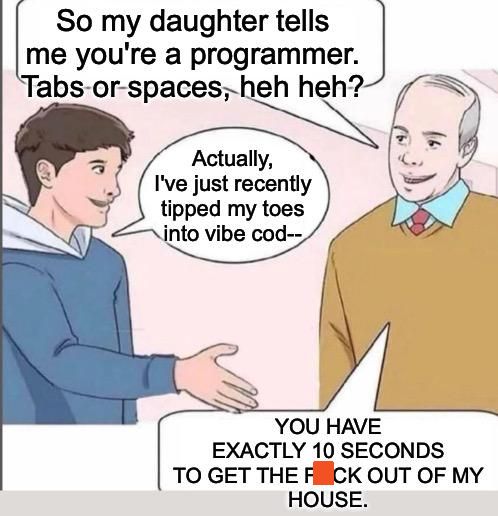
It's moonwalking into the dark ages: Vibe coding. :cry:

You were the guy who said to me (when I exclaimed my astonishment at how ridiculously complex it is just to get items in a Win32 list-view to change colours), "mostly you just copy and paste into other projects once the hard work is done". My sense of accomplishment dithered, withered, and waned. And that was 10 years and two OS's ago.

And yet MS continues to lay-off the middle-class proletariat.
Tuxman
Platinum Member
Platinum Member
Posts: 1708
Joined: 2009 Aug 19, 07:49

Re: drivebar and bookmarks

Post by Tuxman »

I sincerely hope that the enthusiasm for dark mode dies down soon. This complete disregard for human biology and physics, manifested in the de facto abolition of all contrast, will otherwise make the next generations genetically blind from birth.
Kilmatead
Platinum Member
Platinum Member
Posts: 4842
Joined: 2008 Sep 30, 06:52
Location: Baile Átha Cliath

Re: drivebar and bookmarks

Post by Kilmatead »

Tuxman wrote: 2025 May 21, 20:52 ...will otherwise make the next generations genetically blind from birth.
Ah, and so is revealed the true origin of the Morlocks!
Homo-Ecophagus wrote: ...a new name for the human species: "The man who devours the ecosystem." Over the course of its evolution, humans have evolved cultures and adaptations that have now become malignant and that the human species, at the global level, has all the major characteristics of a malignant neoplasm – converting all plant, animal, organic, and inorganic material into human biomass or its adaptive adjuncts and support systems.
We have become our own cancer. Yet while I await the irradiation we so deserve, I'll point out that I rather like dark-modes in programmes (Qt is probably the best multi-platform framework for it I've seen - pity about the bloat), and, if anything, dark-mode is the epitome of contrast, not its abolition.

The next time you try and read the ingredients-list of whatever unhealthy food you choose to consume, only to discover that some numbskull of a colour-blind work-experience teenager thought that green-text on a yellow-background was artistically inspirational, you'll join us underground, shunning the evil things that hide in the glare of light.

Just sayin'. :wink: The joys of ageing. Embrace your inner curmudgeon. Soylent Green is Eloi!
User avatar
nikos
Site Admin
Site Admin
Posts: 16344
Joined: 2002 Feb 07, 15:57
Location: UK

Re: drivebar and bookmarks

Post by nikos »

get into the vibe :)

Image
Tuxman
Platinum Member
Platinum Member
Posts: 1708
Joined: 2009 Aug 19, 07:49

Re: drivebar and bookmarks

Post by Tuxman »

Kilmatead wrote: 2025 May 22, 03:50 Yet while I await the irradiation we so deserve, I'll point out that (...) dark-mode is the epitome of contrast, not its abolition.
I think that depends a lot on what kind of colour-blind weasel has set the colours. :) From time to time I come across software and unfortunately more and more websites that completely ignore my system settings and basically use a "dark mode" - which all too often means "light grey on dark grey" for my taste. Even a company like Apple, which is known for its design tricks, often fails because you can read things best when the foreground and background colours are clearly different.

Of course, it is technically possible to have contrast problems in "light mode". But it is notably less common.
Kilmatead
Platinum Member
Platinum Member
Posts: 4842
Joined: 2008 Sep 30, 06:52
Location: Baile Átha Cliath

Re: drivebar and bookmarks

Post by Kilmatead »

Tuxman wrote: 2025 May 22, 14:08more and more websites that completely ignore my system settings
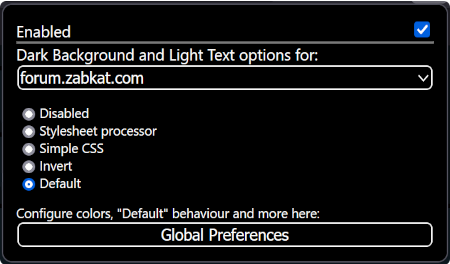
Yeah, I picked up a Firefox plugin that overrides prejudicial websites... but nothing's perfect: sometimes the media-controls vanish but everything else is fine, or you get your grey-on-grey in an overlay and Poseidon himself couldn't fix it. It does, at least, offer an immediate "try something else" menu like a cloud's fleeting shadow in the sun...

Image

...one thing that always catches me out (here) is the "shrug" emoticon thingy, where the little guy rolls his eyes and moves his arms... except on a black background, he has no arms, so it's just a pacman with shifty eyes who seems eternally undecided about his emotional state - which I find oddly comforting and familiar. :D